Loading
Get Record Of Disciplinary Action - Wordpress.com
How it works
-

Open form follow the instructions
-

Easily sign the form with your finger
-

Send filled & signed form or save
How to fill out the Record Of Disciplinary Action - WordPress.com online
Filling out the Record Of Disciplinary Action is a crucial step in documenting workplace incidents and actions taken towards employees. This guide aims to provide clear and supportive instructions to help users complete the form accurately and effectively.
Follow the steps to complete the form successfully.
- Click ‘Get Form’ button to access the Record Of Disciplinary Action document. This will enable you to open and edit the form online.
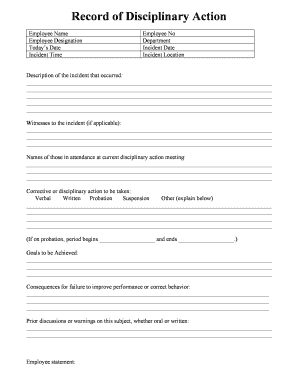
- Begin by entering the employee's full name in the 'Employee Name' field. Make sure the spelling is accurate as this will be part of the official record.
- In the 'Employee Designation' section, provide the current job title of the employee to clearly identify their role within the organization.
- Fill in today's date in the provided space to ensure the documentation reflects the current timing of the disciplinary action.
- Input the employee number in the 'Employee No' field, which is essential for internal tracking and reference.
- Specify the department where the employee works in the 'Department' section to contextualize the disciplinary action.
- Enter the 'Incident Date' to document when the incident occurred, thereby providing a timeline of events.
- Fill out the 'Incident Location' to specify where the incident took place, ensuring that all details are adequately recorded.
- In the 'Description of the incident that occurred' section, provide a detailed account of the incident. Include relevant facts to give a clear understanding of the situation.
- If applicable, list any witnesses to the incident in the designated area to support the claims made in the description.
- Record the names of those present at the current disciplinary action meeting. This helps in maintaining a clear record of who was involved in the discussion.
- Select the 'Corrective or disciplinary action to be taken' by marking one of the options: Verbal, Written, Probation, Suspension, or Other. If 'Other' is selected, provide further explanation in the designated area.
- If probation is specified, indicate the start and end dates of the probation period to clarify the duration of the corrective action.
- Outline the 'Goals to be Achieved' during the disciplinary period to set clear expectations for the employee.
- Detail the 'Consequences for failure to improve performance or correct behavior' to inform the employee of potential repercussions if goals are not met.
- Document any 'Prior discussions or warnings on this subject, whether oral or written,' to provide context for the current disciplinary action.
- In the 'Employee statement' section, allow the employee to express their perspective regarding the incident and the actions taken.
- Obtain the employee's signature along with the date to confirm they have read and understood the content of the form.
- Have the department head and HR manager sign the form with their respective dates to validate the disciplinary action.
- After completing the form, save changes, and opt to download, print, or share the document as necessary to maintain records.
Now that you have the essential steps, complete your Record Of Disciplinary Action online today.
Normally, you will be given a number of disciplinary warnings and have the chance to improve your performance or conduct. You could be dismissed straight away in cases of 'gross misconduct' such as theft or fighting.