Loading
Form preview
  • US Legal Forms
  • Other Templates
  • More Forms
  • More Uncategorized Forms
  • Amscot Money Order Claim Form

Get Amscot Money Order Claim Form

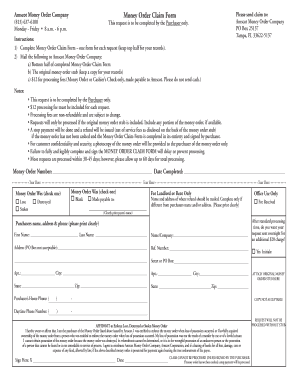
Money Order Claim FormAmscot Money Order Company (813) 6376100 Monday Friday 8 a.m. 6 p.m.Please send claim to: Amscot Money Order Company PO Box 25137 Tampa, FL 336225137This request is to be completed.

How it works

  1. Open form

    Open form follow the instructions

  2. Easily sign form

    Easily sign the form with your finger

  3. Share form

    Send filled & signed form or save

How to fill out the Amscot Money Order Claim Form online

Filling out the Amscot Money Order Claim Form online can help facilitate the process of claiming a lost, stolen, or destroyed money order. This guide provides clear, step-by-step instructions to help users complete the form accurately and efficiently.

Follow the steps to complete the Amscot Money Order Claim Form.

  1. Click ‘Get Form’ button to obtain the Amscot Money Order Claim Form and open it for editing.
  2. In the first section, identify the nature of the claim by checking the appropriate box for whether the money order was lost, stolen, blank, or destroyed.
  3. Provide the money order number and the date completed in the designated fields to ensure accurate processing.
  4. Enter the purchaser's name, address, and phone number clearly. Include a street address as a P.O. Box is not acceptable.
  5. For cases where the refund should be sent to a different address, complete the separate section for the name and address of the payee.
  6. Attach the original money order stub to the bottom half of the completed claim form as it is required for processing.
  7. Sign the affidavit section to affirm your ownership and specify the nature of your claim. Ensure that you date the form as well.
  8. Review all information for accuracy and clarity, as incomplete or illegible forms may delay processing.
  9. Once all fields are filled out, save your changes to the form. You can choose to download, print, or share the completed document as needed.

Begin completing your Amscot Money Order Claim Form online for a smoother claims process.

Get form

Experience a faster way to fill out and sign forms on the web. Access the most extensive library of templates available.
Get form

Related content

Domestic Mail Manual S020 Money Orders and Other...
A customer fills out Form 6387 (available from the carrier) and gives it and the ... The...
Learn more
Check and Money Order Explained - NYU
In the address section at the left of the money order, write "USCIS" on the top line...
Learn more
F. Scott Fitzgerald - Wikipedia
Francis Scott Key Fitzgerald (September 24, 1896 – December 21, 1940) was an American...
Learn more

Related links form

But I Love You Get Me Out Of Here Rachel Reiland Pdf What To Do When Your School's In A Bad Mood Guernsey Emotional

Questions & Answers

Get answers to your most pressing questions about US Legal Forms API.

Contact support

A stop payment will be done and a refund will be issued (net of service fees as disclosed on the back of the money order stub) if the money order has not been cashed and the Money Order Claim Form is completed in its entirety and signed by purchaser.

Many recipients prefer money orders because, unlike a personal check, a money order can't “bounce” and clears almost immediately; therefore, they provide a fast, risk-free form of payment.

Generally, money orders don't have expiration dates. This means you should be able to cash a money order no matter how old it is. But issuers may begin applying fees if a money order goes uncashed for a year or more. The fee can vary.

Important Information About Your Money Order A replacement of the money order will not be considered until 30 days after purchase date and a fee will be charged for this service.

How to Cash a Money Order Do not sign the money order yet. Go to your local branch. Present the original money order to the teller. Provide a government-issued ID. Provide your account information (ATM card, debit card, or deposit slip). Sign (endorse) the money order in front of the teller.

Amscot doesn't offer online tracking for its money orders, so if you need to find out information about a money order you've already sent, you'll have to call their customer support line at (813) 637-6250.

At Amscot, we cash almost all kinds of checks, anytime, and for any amount. Some of the different types of checks we cash include paychecks, government checks, insurance checks, tax refund checks and personal checks. We also cash money orders, cashier's checks, traveler's checks and out-of-state checks.

How to Cash a Money Order Take it to a location that redeems money orders (bank, post office, Walmart, grocery store, etc) to receive its value in cash. Sign the back and deposit it in your bank account like a check.

Get This Form Now!

Use professional pre-built templates to fill in and sign documents online faster. Get access to thousands of forms.
Get form
If you believe that this page should be taken down, please follow our DMCA take down processhere.
Get Amscot Money Order Claim Form
Get form
  • Adoption
  • Bankruptcy
  • Contractors
  • Divorce
  • Home Sales
  • Employment
  • Identity Theft
  • Incorporation
  • Landlord Tenant
  • Living Trust
  • Name Change
  • Personal Planning
  • Small Business
  • Wills & Estates
  • Packages A-Z
  • Affidavits
  • Bankruptcy
  • Bill of Sale
  • Corporate - LLC
  • Divorce
  • Employment
  • Identity Theft
  • Internet Technology
  • Landlord Tenant
  • Living Wills
  • Name Change
  • Power of Attorney
  • Real Estate
  • Small Estates
  • Wills
  • All Forms
  • Forms A-Z
  • Other Templates
  • Legal Hub
  • About Us
  • Help Portal
  • Legal Resources
  • Blog
  • Affiliates
  • Contact Us
  • Delete My Account
  • Site Map
  • Industries
  • Forms in Spanish
  • Localized Forms
  • State-specific Forms
  • Forms Kit
  • Real Estate Handbook
  • All Guides
  • Notarize
  • Incorporation services
  • For Consumers
  • For Small Business
  • For Attorneys
  • USLegal
  • FormsPass
  • pdfFiller
  • signNow
  • altaFlow
  • DocHub
  • Instapage
Form Packages
  • Adoption
  • Bankruptcy
  • Contractors
  • Divorce
  • Home Sales
  • Employment
  • Identity Theft
  • Incorporation
  • Landlord Tenant
  • Living Trust
  • Name Change
  • Personal Planning
  • Small Business
  • Wills & Estates
  • Packages A-Z
Form Categories
  • Affidavits
  • Bankruptcy
  • Bill of Sale
  • Corporate - LLC
  • Divorce
  • Employment
  • Identity Theft
  • Internet Technology
  • Landlord Tenant
  • Living Wills
  • Name Change
  • Power of Attorney
  • Real Estate
  • Small Estates
  • Wills
  • All Forms
  • Forms A-Z
  • Other Templates
Customer Service
  • Legal Hub
  • About Us
  • Help Portal
  • Legal Resources
  • Blog
  • Affiliates
  • Contact Us
  • Delete My Account
  • Site Map
  • Industries
  • Forms in Spanish
  • Localized Forms
  • State-specific Forms
  • Forms Kit
Legal Guides
  • Real Estate Handbook
  • All Guides
Prepared for you
  • Notarize
  • Incorporation services
Our Customers
  • For Consumers
  • For Small Business
  • For Attorneys
Our Sites
  • USLegal
  • FormsPass
  • pdfFiller
  • signNow
  • altaFlow
  • DocHub
  • Instapage
Social Media
Call us now toll free:
+1 833 426 79 33
As seen in:
© Copyright 1999-2026 airSlate Legal Forms, Inc. 17 Station Street, Ste. 203, Brookline, MA 02445
  • Your Privacy Choices
  • Terms of Service
  • Privacy Notice
  • Content Takedown Policy
  • Bug Bounty Program