Loading
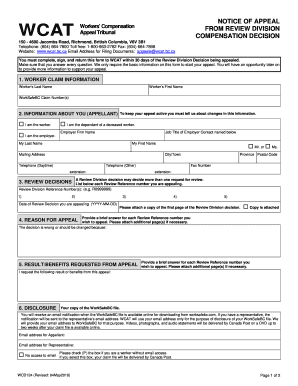
Get Form - Workers' Compensation Appeal Tribunal
How it works
-

Open form follow the instructions
-

Easily sign the form with your finger
-

Send filled & signed form or save
How to fill out the Form - Workers' Compensation Appeal Tribunal online
This guide provides a clear and supportive overview of how to complete the Form - Workers' Compensation Appeal Tribunal online. It walks users through each section of the form, ensuring that everyone, regardless of their legal experience, can understand and follow the process.
Follow the steps to successfully complete the form online.
- Press the ‘Get Form’ button to access the form and open it in your preferred editing format.
- Begin by completing the section titled 'Worker claim information.' Fill in the worker's last and first name, followed by the WorkSafeBC claim number(s). Ensure accuracy in this section as it identifies the primary worker involved.
- In the 'Information about you (Appellant)' section, indicate your relationship to the worker by checking the appropriate box: 'I am the worker,' 'I am the dependant of a deceased worker,' or 'I am the employer.' Provide the employer firm name and the job title of the employer contact if applicable.
- Complete your personal contact information, including your last name, first name, mailing address, daytime and other phone numbers, and fax number.
- List any Review Reference numbers you are appealing in the 'Review Decisions' section. Include the date of the review decision you are appealing against.
- In 'Reason for Appeal,' provide a brief explanation for each review reference number you wish to appeal. Attach additional pages if you need more space.
- Fill in the 'Result/Benefits Requested from Appeal' section, specifying what outcome you are seeking from the appeal.
- In 'Disclosure,' provide your email address for notification purposes regarding your WorkSafeBC file. If you do not have email access, check the corresponding box.
- Select your preferred method of appeal in the 'Method of Appeal' section by checking the box for either written submissions or verbal hearing. If choosing an oral hearing, provide a reason and select your preferred location.
- Indicate if you will be representing yourself or appointing a representative. If appointing one, provide their contact details.
- Read through the 'Certification and Authorization' section carefully. Check the box to confirm your understanding and legal signature, and ensure the form is signed where required.
- Finally, review the 'Form Check-list' to ensure all necessary information is completed and documents are attached. Confirm that you have signed or checked the certification box before submitting.
- Once all sections are filled, save your changes, download the document, and proceed to print or share the form as needed.
Complete your application online today to ensure a smooth appeals process.
Under Texas law, the time limit to file a workers' compensation claim is one year from the date of injury. If the injury is from a work-related disease, the time is one year from the date that the condition was recognized as, or should have been known to be, employment-related.