Loading
Form preview
  • US Legal Forms
  • Other Templates
  • Independent Agency Forms
  • Independent Agency OPM Forms
  • Fers Sf 3107 2006

Get Fers Sf 3107 2006

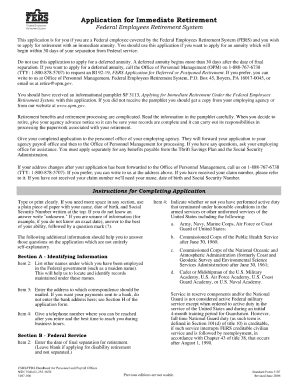
Application for Immediate Retirement Federal Employees Retirement System Federal Employees Retirement System This application is for you if you are a Federal employee covered by the Federal Employees.

How it works

  1. Open form

    Open form follow the instructions

  2. Easily sign form

    Easily sign the form with your finger

  3. Share form

    Send filled & signed form or save

How to fill out the FERS SF 3107 online

The FERS SF 3107 is a crucial document for federal employees seeking to apply for retirement benefits under the Federal Employees Retirement System. This guide will help you navigate the process of filling out the form online with ease and accuracy.

Follow the steps to complete your FERS SF 3107 online

  1. Click the ‘Get Form’ button to obtain the form and open it in your selected editing tool.
  2. Begin by providing your personal information in the designated fields. This includes your full name, Social Security number, and current address. Ensure all information is accurate to avoid delays.
  3. In the next section, indicate your employment details. This should include your position title, agency name, and the dates of your employment. Double-check these dates to confirm that they reflect your service period correctly.
  4. Move on to the section regarding retirement. Specify the type of retirement you are applying for: immediate retirement or deferred retirement. Provide additional information if prompted, such as your retirement date and any relevant service time.
  5. Review the beneficiary information section carefully. List the name and contact details of the person or people designated to receive benefits after your passing. If you need to add multiple beneficiaries, follow the provided instructions.
  6. Complete any required certifications or attestations, confirming that all provided information is truthful and complete. This step is crucial for processing your application.
  7. Once you finish filling out the form, review all sections to ensure accuracy. After confirming that everything is correct, save your changes, download a copy of the form for your records, and print it if necessary. Sharing options may also be available for submission.

Complete your FERS SF 3107 online today to ensure a smooth retirement application process.

Get form

Experience a faster way to fill out and sign forms on the web. Access the most extensive library of templates available.

Related content

Application for Immediate Retirement (Federal...
All documents applicant shows as attached to SF 3107 c. If applicant is married and elects...
Learn more
voluntary retirement checklist - FERS
Sep 18, 2018 — Complete SF 3107-2 Spouse's Consent to Survivor Election only if you are...
Learn more
Reference Manual
fers control to that location plus one (first instruction of subroutine). BRM also stores...
Learn more

Related links form

VFW Trustees Report of Audit SC BCHP Dental Reimbursement Form 2018 Canada ESDC INS5178 2012 IRS 8621 2018

Questions & Answers

Get answers to your most pressing questions about US Legal Forms API.

Contact support

To reinstate your FERS annuity supplement, you must contact the retirement office that managed your initial application. Provide necessary details and explain your situation clearly. If reinstatement forms are required, request them promptly to avoid delays. Utilizing USLegalForms can simplify the submission process and ensure you have the right information at your fingertips.

Yes, the FERS annuity supplement is considered taxable income by the IRS. You'll need to report this income on your annual tax return. To ensure accuracy in your tax filings, familiarize yourself with the applicable tax regulations regarding supplemental income. USLegalForms can assist you with documentation and provide answers to any specific tax-related questions.

The FERS supplement does not automatically disappear unless specific circumstances occur, such as reaching your full retirement age or ceasing to meet eligibility requirements. Understanding your particular situation can clarify when and why it might be affected. Regularly review your benefits and consult resources like USLegalForms to stay informed.

To reinstat your FERS supplement, you need to submit a request to the retirement office where you applied previously. Fill out the required forms and include any necessary documentation that supports your request. Make sure to highlight your reasons for seeking reinstatement. Using platforms like USLegalForms can help streamline this process for you.

To apply for the FERS special retirement supplement, start by filling out the FERS SF 3107 form. This form is crucial in determining your eligibility and benefits. After submission, your application will undergo review by the designated retirement office. If you have questions during this process, resources like USLegalForms can provide you with the necessary assistance and information.

To request a certified summary of your federal service, you need to complete a form SF 3107, also known as the FERS SF 3107. You can submit this form to the appropriate agency that manages your federal employment records. It's essential to ensure that all details are accurate, as this will facilitate a smooth review process. If you need help with the process, consider using USLegalForms for guidance and templates.

Submitting a retirement notice involves completing the FERS SF 3107 and notifying your manager. It's advisable to give your employer a minimum of 30 days notice prior to your intended retirement date. This proactive communication helps in ensuring a smooth transition for both you and your workplace.

For USPS retirement paperwork, including the FERS SF 3107, you should send your documents to the designated retirement office address provided on the form. Be sure to check their website for any updates on the mailing address to ensure your paperwork arrives safely.

You can submit the FERS SF 3107 form via mail to the Office of Personnel Management. Make sure that you have signed the form and included any necessary attachments. This careful submission helps avoid delays in your retirement processing.

To email OPM retirement services regarding your FERS SF 3107 inquiries, you can visit their official website. Locate the 'Contact Us' section to find the appropriate email address for retirement services. When you send your email, be clear and specific about your situation to ensure a prompt response.

Get This Form Now!

Use professional pre-built templates to fill in and sign documents online faster. Get access to thousands of forms.
If you believe that this page should be taken down, please follow our DMCA take down processhere.
Get FERS SF 3107
  • Adoption
  • Bankruptcy
  • Contractors
  • Divorce
  • Home Sales
  • Employment
  • Identity Theft
  • Incorporation
  • Landlord Tenant
  • Living Trust
  • Name Change
  • Personal Planning
  • Small Business
  • Wills & Estates
  • Packages A-Z
  • Affidavits
  • Bankruptcy
  • Bill of Sale
  • Corporate - LLC
  • Divorce
  • Employment
  • Identity Theft
  • Internet Technology
  • Landlord Tenant
  • Living Wills
  • Name Change
  • Power of Attorney
  • Real Estate
  • Small Estates
  • Wills
  • All Forms
  • Forms A-Z
  • Other Templates
  • Legal Hub
  • About Us
  • Help Portal
  • Legal Resources
  • Blog
  • Affiliates
  • Contact Us
  • Delete My Account
  • Site Map
  • Industries
  • Forms in Spanish
  • Localized Forms
  • State-specific Forms
  • Forms Kit
  • Real Estate Handbook
  • All Guides
  • Notarize
  • Incorporation services
  • For Consumers
  • For Small Business
  • For Attorneys
  • USLegal
  • FormsPass
  • pdfFiller
  • signNow
  • altaFlow
  • DocHub
  • Instapage
Form Packages
  • Adoption
  • Bankruptcy
  • Contractors
  • Divorce
  • Home Sales
  • Employment
  • Identity Theft
  • Incorporation
  • Landlord Tenant
  • Living Trust
  • Name Change
  • Personal Planning
  • Small Business
  • Wills & Estates
  • Packages A-Z
Form Categories
  • Affidavits
  • Bankruptcy
  • Bill of Sale
  • Corporate - LLC
  • Divorce
  • Employment
  • Identity Theft
  • Internet Technology
  • Landlord Tenant
  • Living Wills
  • Name Change
  • Power of Attorney
  • Real Estate
  • Small Estates
  • Wills
  • All Forms
  • Forms A-Z
  • Other Templates
Customer Service
  • Legal Hub
  • About Us
  • Help Portal
  • Legal Resources
  • Blog
  • Affiliates
  • Contact Us
  • Delete My Account
  • Site Map
  • Industries
  • Forms in Spanish
  • Localized Forms
  • State-specific Forms
  • Forms Kit
Legal Guides
  • Real Estate Handbook
  • All Guides
Prepared for you
  • Notarize
  • Incorporation services
Our Customers
  • For Consumers
  • For Small Business
  • For Attorneys
Our Sites
  • USLegal
  • FormsPass
  • pdfFiller
  • signNow
  • altaFlow
  • DocHub
  • Instapage
Social Media
Call us now toll free:
+1 833 426 79 33
As seen in:
© Copyright 1999-2026 airSlate Legal Forms, Inc. 17 Station Street, Suite 303, Brookline, MA 02445
  • Your Privacy Choices
  • Terms of Service
  • Privacy Notice
  • Content Takedown Policy
  • Bug Bounty Program
FERS SF 3107
This form is available in several versions.
Select the version you need from the drop-down list below.
2014 FERS SF 3107
Select form
  • 2014 FERS SF 3107
  • 2012 FERS SF 3107
  • 2006 FERS SF 3107
  • 2000 FERS SF 3107
Select form