Loading
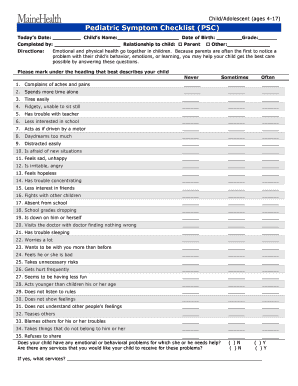
Get Mental Health Assessment
How it works
-

Open form follow the instructions
-

Easily sign the form with your finger
-

Send filled & signed form or save
How to fill out the Mental Health Assessment online
Filling out the Mental Health Assessment is an essential step in understanding your child's emotional and behavioral needs. This guide will help you navigate the form with clarity and confidence, ensuring you provide the necessary information for your child's care.
Follow the steps to complete the Mental Health Assessment online.
- Press the ‘Get Form’ button to access the Mental Health Assessment document and open it in your preferred online editor.
- Start by entering today’s date at the top of the form.
- Input your child’s name in the designated field.
- Indicate who has completed the form by selecting the appropriate option.
- Provide your child's date of birth.
- Specify your relationship to the child, ensuring to use inclusive language.
- State your child's current grade level.
- Begin answering the questions in the emotional and behavioral section. Mark the answer that best reflects your child's experience for each statement.
- Move on to the Home and School Impairment Scale, circling the number that best describes your child's degree of impairment in each listed domain.
- If you answered 'yes' to the question about emotional or behavioral problems, provide details on any services you believe your child requires.
- Review all your entries to ensure accuracy and completeness.
- Once satisfied, save your changes, and choose to download, print, or share the completed form as necessary.
Complete your Mental Health Assessment online today to support your child's well-being.
Adult Mental Health Assessment Evaluations typically consist of a written questionnaire, interview questions, lab tests and physical examination. Commonly used tools of diagnosis for mental disorders we use include: Patient Health Questionnaire (PHQ-9) - the most common screening tool to identify depression.