Loading
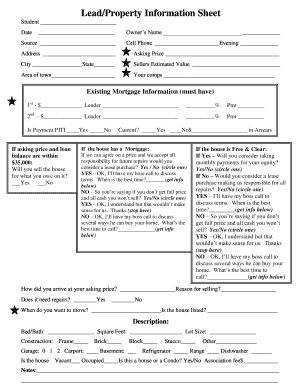
Get Ron Legrand Lead/property Information Sheet
How it works
-

Open form follow the instructions
-

Easily sign the form with your finger
-

Send filled & signed form or save
How to fill out the Ron LeGrand Lead/Property Information Sheet online
Completing the Ron LeGrand Lead/Property Information Sheet online is a crucial step in the property evaluation process. This guide will help you navigate each section of the form with clarity and ease, ensuring you provide all necessary information accurately.
Follow the steps to complete the Lead/Property Information Sheet seamlessly.
- Press the ‘Get Form’ button to access the Lead/Property Information Sheet and open it in the appropriate online editor.
- Begin by entering your name in the 'Student' section at the top of the form.
- Fill in the 'Owner’s Name' section with the name of the property owner as applicable.
- Input the 'Source' of the lead to help track its origins.
- Provide the cell phone number and evening phone number for easy contact.
- Complete the address fields, including city and state, in the designated areas.
- Enter the asking price for the property in the corresponding field.
- Record the seller's estimated value of the property in the next field.
- Specify the area of town where the property is located.
- List your comparable sales in the 'Your comps' section to support your asking price.
- In the 'Existing Mortgage Information' section, provide details for both the first and second mortgages, including the lender, amount, interest rate, and payment.
- Indicate whether the mortgage payment includes principal, interest, taxes, and insurance (PITI) by ticking the appropriate box.
- If the asking price and loan balance are close, answer whether you will sell the house for what is owed.
- Clarify the current status of the mortgage and provide any arrears information.
- For properties with a mortgage, respond to questions about willingness to agree to a lease purchase agreement.
- For properties that are free and clear, answer similar questions regarding payment options.
- Explain how the asking price was determined and state the reason for selling.
- Indicate if any repairs are needed on the property and specify the desired move-out date.
- Specify whether the house is listed or not.
- Fill in the property description, including the number of bedrooms and bathrooms, square footage, lot size, construction type, and any additional features.
- Indicate if the house is vacant or occupied, and whether it is a house or a condo.
- Finally, add any relevant notes in the designated section.
- After completing all sections, save your changes, download a copy, print the form, or share it as needed.
Start completing your Ron LeGrand Lead/Property Information Sheet online today to streamline your property evaluation process!