Loading
Get Medical Mutual Form Z529 2017-2026
How it works
-

Open form follow the instructions
-

Easily sign the form with your finger
-

Send filled & signed form or save
How to fill out the Medical Mutual Form Z529 online
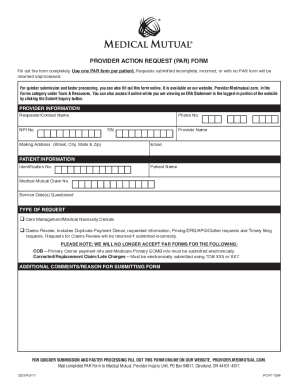
The Medical Mutual Form Z529, known as the Provider Action Request (PAR) Form, is essential for providers seeking adjustments to previous payments. This guide offers clear, step-by-step instructions to ensure a smooth online completion of the form.
Follow the steps to successfully complete the Medical Mutual Form Z529 online.
- Click 'Get Form' button to obtain the form and open it in the editor for online completion.
- Provide your provider information. Enter your name, tax identification number, contact details, and mailing address into the designated fields.
- Input patient information accurately. Include the patient’s name, identification number, Medical Mutual claim number, and the dates of service that are being questioned.
- Select the type of request from the options provided. Ensure to check only one option that best describes your situation, such as Care Management or Claims Review.
- In the additional comments section, provide any necessary explanations or reasons for submitting the form. Be precise and include any relevant details.
- Review all entered information for accuracy. Make sure that all fields are completed and check that each entry is clear and correct.
- Once confirmed, you can save your changes, download the form for your records, print a copy, or share it as needed.
Complete the Medical Mutual Form Z529 online today for efficient processing of your requests!
The timely filing limit for Medical Mutual claims is typically specified in your policy agreement. Generally, it is advisable to submit claims within a specific time frame to ensure proper processing. For details regarding the Medical Mutual Form Z529, please refer to your policy or contact Medical Mutual customer service for precise information on deadlines.