Loading
Get Rma (return Merchandise Authorization) Form - Urban Ag
How it works
-

Open form follow the instructions
-

Easily sign the form with your finger
-

Send filled & signed form or save
How to fill out the RMA (Return Merchandise Authorization) Form - Urban Ag online
Filing an RMA form is a crucial step when seeking to return a product due to issues like damage or defects. This guide will assist you in completing the RMA form for Urban Ag with clarity and efficiency.
Follow the steps to complete the RMA form accurately.
- Press the ‘Get Form’ button to access the RMA form and open it for editing.
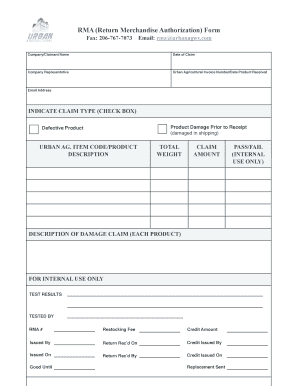
- Fill in the 'Company/Claimant Name' field with your official name or the name of the entity initiating the claim.
- Enter the 'Date of Claim' in the specified format to indicate when the claim is being filed.
- Complete the 'Company Representative' section with the name of the individual handling the claim.
- Input the 'Urban Agricultural Invoice Number' and the 'Date Product Received' to reference the original purchase.
- Add your 'Email Address' for communication regarding the claim.
- Indicate the claim type by selecting the appropriate checkbox for 'Product Damage Prior to Receipt' or 'Defective Product'.
- Fill in the 'Urban Ag Item Code/Product Description' to specify the product in question.
- Enter the 'Total Weight' of the products being returned or reported.
- State the 'Claim Amount' that reflects the monetary value of the claim.
- Provide a detailed 'Description of Damage Claim' for each product affected.
- Review the section labeled 'For Internal Use Only' which includes additional claims processing information.
- After filling out the entire form, ensure all details are accurate, then save changes as per your preference to download, print, or share the completed RMA form.
Complete your RMA form online today for a swift resolution to your claim.
To request an RMA number, customers can usually fill out a form on the company's website or contact customer service.