Loading
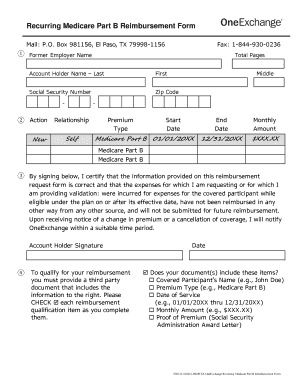
Get Medicare Reimbursement Form
How it works
-

Open form follow the instructions
-

Easily sign the form with your finger
-

Send filled & signed form or save
How to fill out the Medicare Reimbursement Form online
Filling out the Medicare Reimbursement Form online can be a straightforward process with the right guidance. This guide provides step-by-step instructions to help you complete the form accurately and efficiently.
Follow the steps to successfully complete the form
- Click ‘Get Form’ button to obtain the form and open it in the editor.
- Fill in the account holder information by providing the name (last, first, and middle), social security number, and zip code.
- In the Action section, specify whether this is a new request, a change, or an end to the reimbursement request.
- Indicate the relationship between the account holder and the person requesting the premium reimbursement, such as self or spouse.
- Provide details regarding the premium type, start date, end date, and monthly amount. Ensure these match the supporting documents.
- Review the certification requirements. By signing, you confirm that the information provided is correct and valid.
- Check off each reimbursement qualification item to ensure all necessary documentation is included.
- Once all sections are completed, save your changes, download the form, print it for your records, or share it as needed.
Start filling out your Medicare Reimbursement Form online today.
Medicare reimbursement is the process by which a doctor or health facility receives funds for providing medical services to a Medicare beneficiary. However, Medicare enrollees may also need to file claims for reimbursement if they receive care from a provider that does not accept assignment.