Loading
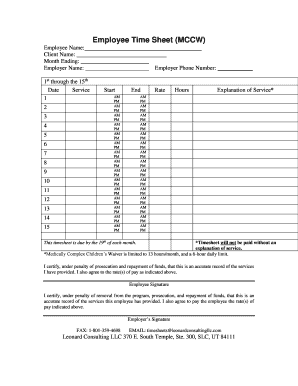
Get Utahfiscal Agent Time Sheet - Leonard Consulting
How it works
-

Open form follow the instructions
-

Easily sign the form with your finger
-

Send filled & signed form or save
How to fill out the UtahFiscal Agent Time Sheet - Leonard Consulting online
Filling out the UtahFiscal Agent Time Sheet - Leonard Consulting accurately is essential for timely processing and payment. This guide provides clear, step-by-step instructions to help users navigate the form efficiently.
Follow the steps to complete the time sheet successfully.
- Click ‘Get Form’ button to access the UtahFiscal Agent Time Sheet and open it in your preferred online editing tool.
- Begin by entering the employee name, client name, employer name, and the month ending in the designated fields at the top of the form.
- In the section labeled '1st through the 15th', fill in the date, service provided, start and end times for each day of service, using AM/PM format as applicable.
- Record the rate of pay and total hours worked for each day in the 'Rate' and 'Hours' fields respectively.
- For each day, provide an explanation of the service in the 'Explanation of Service' section. Note that payment cannot be processed without an explanation.
- Repeat the process for the '16th through the 31st' section, ensuring to fill out the same fields accordingly.
- Lastly, review the completed form for accuracy before signing it to certify the information. Both the employee and employer must provide their signatures in the designated areas.
- Once the information is complete and accurate, save your changes. You can then download, print, or share the form as needed.
Complete your timesheet online efficiently to ensure that your payment is processed on time.