Loading
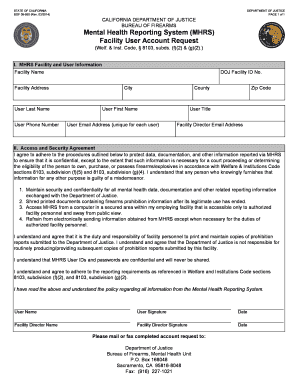
Get Mhrs Bof 08 950
How it works
-

Open form follow the instructions
-

Easily sign the form with your finger
-

Send filled & signed form or save
How to fill out the Mhrs Bof 08 950 online
The Mhrs Bof 08 950 form is essential for requesting a facility user account within the California Department of Justice's Mental Health Reporting System. This guide aims to provide a step-by-step approach to correctly completing the form online, ensuring clarity and ease of use for all individuals involved.
Follow the steps to complete the Mhrs Bof 08 950 online
- Click ‘Get Form’ button to access the Mhrs Bof 08 950 document electronically and open it for editing.
- In the MHRS Facility and User Information section, fill in the facility name and address. Provide specific details such as the city, county, and zip code.
- Enter your last name, first name, phone number, email address (ensuring it is unique), and user title in the designated fields.
- Locate the DOJ Facility ID number field (if applicable) and add the corresponding identification number.
- In the Access and Security Agreement section, read through the outlined procedures carefully.
- Acknowledge your agreement by entering your name, signature, and today's date in the designated fields.
- The facility director must also provide their name, signature, and date, ensuring all information is accurate.
- Finally, save the completed form, then choose to download, print, or share it, depending on your submission preferences.
Complete your Mhrs Bof 08 950 online today to ensure timely processing.