Loading
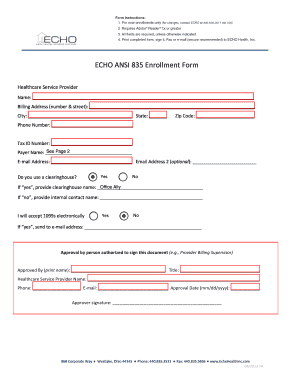
Get Echo Ansi 835 Enrollment Form - Officeally
How it works
-

Open form follow the instructions
-

Easily sign the form with your finger
-

Send filled & signed form or save
How to fill out the ECHO ANSI 835 Enrollment Form - OfficeAlly online
Filling out the ECHO ANSI 835 Enrollment Form online can seem daunting, but with clear instructions and a systematic approach, you can complete it with confidence. This guide provides a detailed walkthrough of each section and field, ensuring that you submit your enrollment correctly.
Follow the steps to complete the form accurately.
- Click ‘Get Form’ button to obtain the form and open it in the editor.
- Begin with the healthcare service provider name. Clearly print the full name of the provider in the designated field.
- Next, fill in the billing address. This includes the number and street, followed by the city, state, and zip code in the respective fields.
- Enter the phone number under the designated phone number field, followed by the tax ID number in the next field.
- Identify the payer name and provide the corresponding email address in the provided fields. You can also fill in a secondary email address if applicable.
- Indicate whether you use a clearinghouse by selecting 'Yes' or 'No.' If you select 'Yes,' provide the name of the clearinghouse. If 'No,' provide the name of an internal contact.
- State your preference for receiving 1099s electronically by selecting 'Yes' or 'No.' If you choose 'Yes,' specify the email address where you would like to receive them.
- Approval by the person authorized to sign this document is required. Print the name of the approver, their title, the healthcare service provider name, phone number, email, and approval date in the designated fields.
- The approver must sign in the designated signature field.
- If applicable, check the appropriate payers for enrollment as detailed in the provided list and write their payer IDs in the respective section.
- Once all fields are completed, you can save changes, download, print, or share the completed form as needed.
Take the first step towards enrollment by completing the ECHO ANSI 835 Enrollment Form online today.