Loading
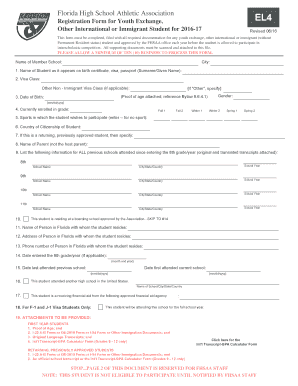
Get Registration Form For Youth Exchange, El4
How it works
-

Open form follow the instructions
-

Easily sign the form with your finger
-

Send filled & signed form or save
How to fill out the registration form for youth exchange, EL4 online
The registration form for youth exchange, EL4, is essential for international and immigrant students to participate in interscholastic competition. This guide provides a comprehensive, step-by-step approach to filling out the form online efficiently.
Follow the steps to successfully complete the registration form.
- Click ‘Get Form’ button to obtain the form and open it in the editor.
- Begin by entering the name of the member school and its city. This information helps to identify which school the student is associated with.
- Fill in the student's name as it appears on their birth certificate, visa, or passport, ensuring the surname and given name are clearly distinguished.
- Specify the visa class applicable to the student. If the student has an 'Other Non-Immigrant Visa Class,' please indicate it.
- Input the student's date of birth in the format mm/dd/yyyy. Make sure this matches official documents.
- Select the current grade in which the student is enrolled. Options range from Fall 1 to Spring 2.
- List the sports in which the student wishes to participate. If there are none, enter '--' for no sport.
- Indicate the student's country of citizenship.
- If the student is returning and has been previously approved, specify this information.
- Enter the name of the parent who is not the host parent.
- List all previous schools attended since entering the 8th grade, along with the corresponding city/state/country and school years. Attach original and translated transcripts.
- If the student resides at a boarding school approved by the association, skip to question 14. Otherwise, provide the name, address, and phone number of the person in Florida with whom the student resides.
- Specify the dates for when the student entered the 9th grade and attended previous/current schools.
- Indicate if the student is receiving financial aid from an approved agency.
- Attach all required documents based on whether the student is a first-year or returning student, including proof of age and visa forms.
- Once all fields are completed, review the form for accuracy. Make any necessary edits before finalizing.
- Save changes, download, print, or share the completed form as needed.
Complete the registration form online today to ensure timely processing.
Related links form
CAMP TULAHEAD CAMPER MEDICAL INFORMATION Please Complete This Form And Submit With Your Childs
IABGR NARC Islamabad-45500 Pakistan Germplasm Request Form - Old Parc Gov
University Of Perpetual Help System DALTA Alabang-Zapote - Perpetualdalta Edu
Daikin Project Checklist - BHoffmanb Amp BHoffmanb Inc
Industry-leading security and compliance
US Legal Forms protects your data by complying with industry-specific security standards.
-
In businnes since 199725+ years providing professional legal documents.
-
Accredited businessGuarantees that a business meets BBB accreditation standards in the US and Canada.
-
Secured by BraintreeValidated Level 1 PCI DSS compliant payment gateway that accepts most major credit and debit card brands from across the globe.