Get Masonicare Hr-22 2011-2026
How it works
-

Open form follow the instructions
-

Easily sign the form with your finger
-

Send filled & signed form or save
How to fill out the Masonicare HR-22 online
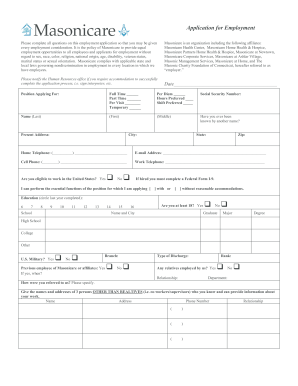
This guide provides a comprehensive, user-friendly overview of how to complete the Masonicare HR-22 application for employment online. It aims to assist all users, regardless of their level of experience with digital forms.
Follow the steps to complete the Masonicare HR-22 application online.
- Click ‘Get Form’ button to access the Masonicare HR-22 form and open it for editing.
- Begin by entering the date at the top of the form, followed by the position you are applying for. Indicate your preferred employment type by selecting full time, part time, per visit, temporary, or per diem.
- Provide your social security number, and fill in your personal information including your name (last, first, middle), any other name you may have used, and your present address, including city, state, and zip code.
- Enter your contact information, including your home telephone number, email address, cell phone number, and work telephone number.
- Indicate whether you are eligible to work in the United States and your ability to perform the essential functions of the position with or without reasonable accommodations.
- Fill in your educational background by circling the last year completed and listing relevant schools, majors, and degrees.
- If applicable, provide information related to your military service and include any relatives that may be employed by Masonicare.
- List how you were referred to the organization and provide names and contact information for three non-relative references.
- Document your work history, starting with your most recent employer, including company name, employment dates, job title, duties, and reasons for leaving for the last four positions.
- Respond to the required questions regarding your eligibility for Federal healthcare programs and any disciplinary actions previously faced.
- Complete any additional sections specific to your profession, including licensures, certifications, and training courses completed.
- Review all the information provided, ensuring accuracy and completeness before signing and dating the application.
- Finally, save your changes and choose to download, print, or share the completed Masonicare HR-22 form.
Complete your Masonicare HR-22 application online today for a smoother application experience.
Masonicare merged with several organizations over the years to enhance its service offerings, strengthening its position in the healthcare sector. These strategic partnerships aim to broaden the scope of services under the Masonicare HR-22 program. Merging with other health providers allows Masonicare to expand its reach and improve the quality of care available to its clients. Such collaborations ensure that you receive comprehensive and innovative solutions.