Loading
Get Ast Transfer Of Ownership With W 9 Form
How it works
-

Open form follow the instructions
-

Easily sign the form with your finger
-

Send filled & signed form or save
How to fill out the Ast Transfer Of Ownership With W 9 Form online
This guide provides clear and comprehensive instructions on how to fill out the Ast Transfer Of Ownership With W 9 Form online. Whether you are transferring stock ownership or ensuring proper tax information is recorded, this guide will support you in completing the form accurately.
Follow the steps to complete the form effectively.
- Press the ‘Get Form’ button to access the form and open it in your web browser.
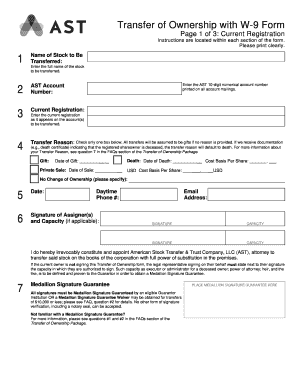
- In the 'Name of Stock to Be Transferred' field, enter the full name of the stock you wish to transfer.
- Provide your AST account number, which is the 10-digit numerical number listed on all account communications.
- Complete the 'Current Registration' field exactly as it appears on your current account documentation.
- Select a 'Transfer Reason' by checking only one box. If no reason is provided, transfers will default as gifts. Remember to include relevant dates if applicable.
- Print the current date in the designated date section of the form.
- Sign in the space designated for the signature of assigner(s). If applicable, state your capacity next to the signature.
- Provide your daytime phone number and email address for contact purposes.
- Locate the Medallion Signature Guarantee area. Ensure all signatures are guaranteed by an eligible institution as required.
- In the 'New Registration' section, input the full name of the new owner and indicate the number of certificated shares, book shares, and DRIP shares.
- Select the appropriate type of registration—options include Individual, Joint Account, Trust, or Custodian Account. Be sure to include all relevant details as necessary.
- Enter the complete address for the new owner in the 'Full Address' section.
- In the 'Substitute Form W-9' section, select the correct box for tax classification and provide your Taxpayer Identification Number (TIN) accurately.
- Complete Part II with the necessary certifications regarding backup withholding and sign the form. Ensure the signature matches the TIN provided.
- Finally, save your changes, download the form, print a copy, or share it as required.
Start filling out your documents online today to ensure a smooth ownership transfer process.
How To Transfer S Corp Stock To Someone Else Talk to the other person to see if they have a brokerage account. ... You need to get the Account Details from the recipient. ... You must authorize the transfer. ... Finally, you will need to wait for the transfer to be completed.
Industry-leading security and compliance
US Legal Forms protects your data by complying with industry-specific security standards.
-
In businnes since 199725+ years providing professional legal documents.
-
Accredited businessGuarantees that a business meets BBB accreditation standards in the US and Canada.
-
Secured by BraintreeValidated Level 1 PCI DSS compliant payment gateway that accepts most major credit and debit card brands from across the globe.