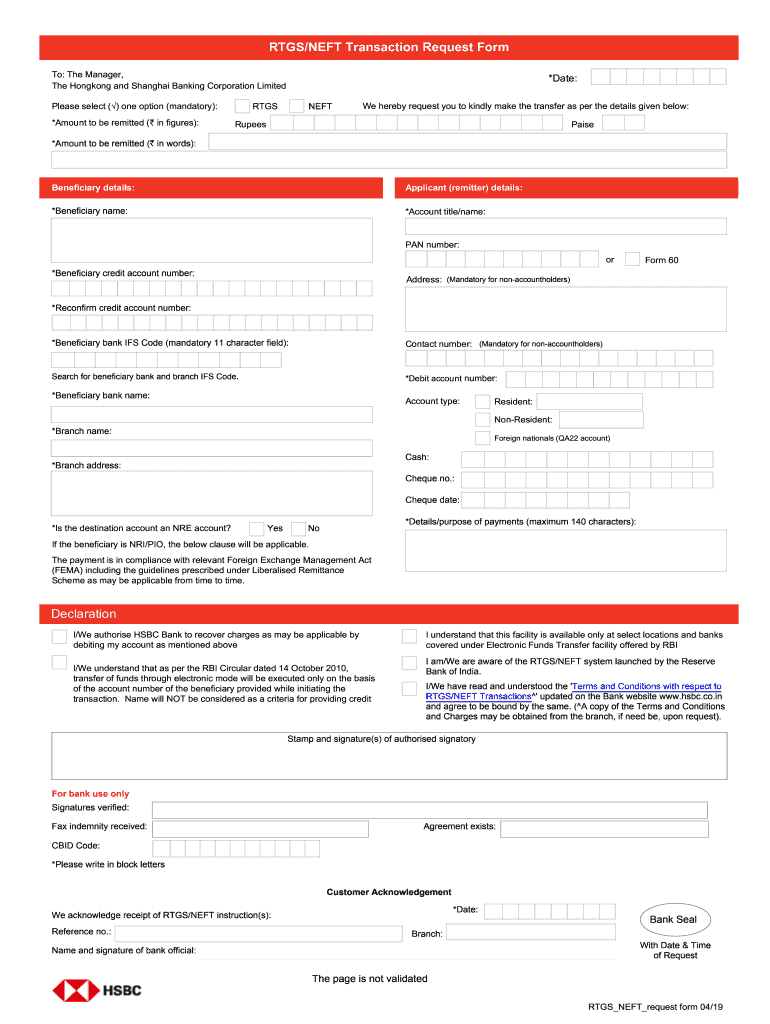
RTGS/NEFT Transaction Request Form To The Manager The Hongkong and Shanghai Banking Corporation Limited We hereby request you to kindly make the transfer as per the details given below Please select one option mandatory Amount to be remitted in figures Date Rupees Paise Applicant remitter details Account title/name PAN number or Form 60 Address Contact number Debit account number Account type Resident Non-Resident Foreign nationals QA22 account Is the destination account an NRE account If the beneficiary is NRI/PIO the below clause will be applicable. The payment is in compliance with relevant Foreign Exchange Management Act FEMA including the guidelines prescribed under Liberalised Remittance Scheme as may be applicable from time to time. Declaration I/We authorise HSBC Bank to recover charges as may be applicable by debiting my account as mentioned above I understand that this facility is available only at select locations and banks covered under Electronic Funds Transfer facility o....
Loading

Open form follow the instructions

Easily sign the form with your finger

Send filled & signed form or save
How to fill out the HSBC RTGS/NEFT Transaction Request Form online
Filling out the HSBC RTGS/NEFT Transaction Request Form online is a straightforward process. This guide provides step-by-step instructions to help users complete the form accurately and efficiently, ensuring successful electronic fund transfers.
Follow the steps to complete the transaction request form effectively.
- Press the ‘Get Form’ button to access the HSBC RTGS/NEFT Transaction Request Form and open it in your preferred document editor.
- Select the type of transaction by marking one option provided on the form. This step is mandatory and must be clearly indicated.
- Enter the amount to be remitted in figures. Make sure to specify the amount in 'Rupees' and 'Paise' as required.
- Fill out the date of the transaction accurately.
- Provide the applicant (remitter) details, starting with the account title or name. Ensure this information matches your bank records.
- Input the PAN number, or if applicable, choose to submit Form 60.
- Include your complete address for verification purposes.
- List your contact number to facilitate communication regarding the transaction.
- Enter the debit account number from which the funds are to be withdrawn. Be cautious to avoid any errors.
- Select the account type relevant to the debit account: Resident, Non-Resident, or Foreign nationals (QA22 account).
- Indicate whether the destination account is an NRE account, especially if the beneficiary is an NRI/PIO.
- Read and acknowledge the declaration section where you authorize HSBC Bank to recover any applicable charges by debiting your account.
- Confirm your understanding that this service is available only at select locations and banks that participate in the Electronic Funds Transfer facility.
- Acknowledge that the transfer will be executed solely based on the beneficiary’s account number, as stated in the RBI Circular dated 14 October 2010.
- Once all fields are filled correctly, save changes, download, print, or share the completed form as necessary.
Complete your transaction request form online confidently and ensure smooth fund transfers today.
Experience a faster way to fill out and sign forms on the web. Access the most extensive library of templates available.
Related content
NEFT/RTGS. Substantial growth in both inward and outward. RTGS/NEFT remittances has been...
Without financial transactions – 9.30 A.M. to 5.00 P.M.. With financial transactions –...
The difference between NEFT and RTGS is that NEFT settlements happen in batches, and on...
Get answers to your most pressing questions about US Legal Forms API.
What is the NEFT RTGS?
The term 'NEFT RTGS' refers to the two distinct electronic payment systems offered by banks like HSBC. NEFT is used for lower-value, non-urgent transactions, while RTGS is designed for high-value, immediate fund transfers. Familiarizing yourself with these systems can assist you in accurately completing the HSBC RTGS/NEFT Transaction Request Form, ensuring timely transactions.
What are the disadvantages of NEFT?
One of the main disadvantages of NEFT is its batch processing system, which may cause delays in fund transfers, particularly for urgent payments. Additionally, NEFT operates only during specific hours, making it unsuitable for time-sensitive transactions. By understanding these limitations, you can decide when to use the HSBC RTGS/NEFT Transaction Request Form for your transactions.
What is NEFT vs RTGS HSBC?
In the context of HSBC, NEFT (National Electronic Funds Transfer) and RTGS (Real Time Gross Settlement) serve different purposes. NEFT processes transactions in batches, typically settling within hours, while RTGS handles real-time transactions for high-value amounts. Knowing these differences helps you select the appropriate section on the HSBC RTGS/NEFT Transaction Request Form.
How to do RTGS from HSBC bank?
To perform an RTGS transaction from HSBC, you need to fill out the HSBC RTGS/NEFT Transaction Request Form. You’ll provide details such as the beneficiary's account number and the amount you wish to transfer. After completing the form, submit it through your nearest branch or online banking portal, ensuring fast and secure fund transfer.
Is it better to do RTGS or NEFT?
The choice between RTGS and NEFT depends on your specific needs. RTGS is suited for high-value, urgent transactions, as it processes payments in real-time. NEFT, on the other hand, is ideal for lower-value transactions that can wait until the hourly batch processing. Consider your requirements when filling out the HSBC RTGS/NEFT Transaction Request Form.
What is RTGS NEFT request form?
The RTGS NEFT request form is a document that enables you to initiate fund transfers through the RTGS and NEFT systems at HSBC. This form captures essential information such as the sender's and recipient's details, as well as the transaction amount. By completing the HSBC RTGS/NEFT Transaction Request Form correctly, you facilitate smooth and efficient transactions.
Is RTGS the same as Swift?
No, RTGS and Swift are not the same. While RTGS (Real Time Gross Settlement) is a payment system for high-value transactions within the country, Swift is an international network for secure financial messaging. Understanding the difference can help you determine the right HSBC RTGS/NEFT Transaction Request Form to use for your needs.
How to do NEFT in HSBC?
To perform NEFT transactions in HSBC, start by filling out the HSBC RTGS/NEFT Transaction Request Form. You can complete this form either online or in person at a branch. After providing all necessary information, such as the recipient's bank details and transaction amount, submit the form for processing.
What is the daily limit for NEFT in HSBC?
The daily limit for NEFT transactions in HSBC may vary based on your account type and status. Generally, there is no specific cap, but it is wise to check with HSBC directly for your account’s specific limitations. Using the HSBC RTGS/NEFT Transaction Request Form can help streamline your transactions within those limits.
How to fill NEFT and RTGS form?
Filling the NEFT and RTGS forms involves providing accurate beneficiary details and the transaction amount. Ensure you have your HSBC RTGS/NEFT Transaction Request Form handy, as it contains sections for details like account information and transaction type. Double-check all inputs for accuracy before submission to avoid processing delays.
Use professional pre-built templates to fill in and sign documents online faster. Get access to thousands of forms.
If you believe that this page should be taken down, please follow our DMCA take down process here.