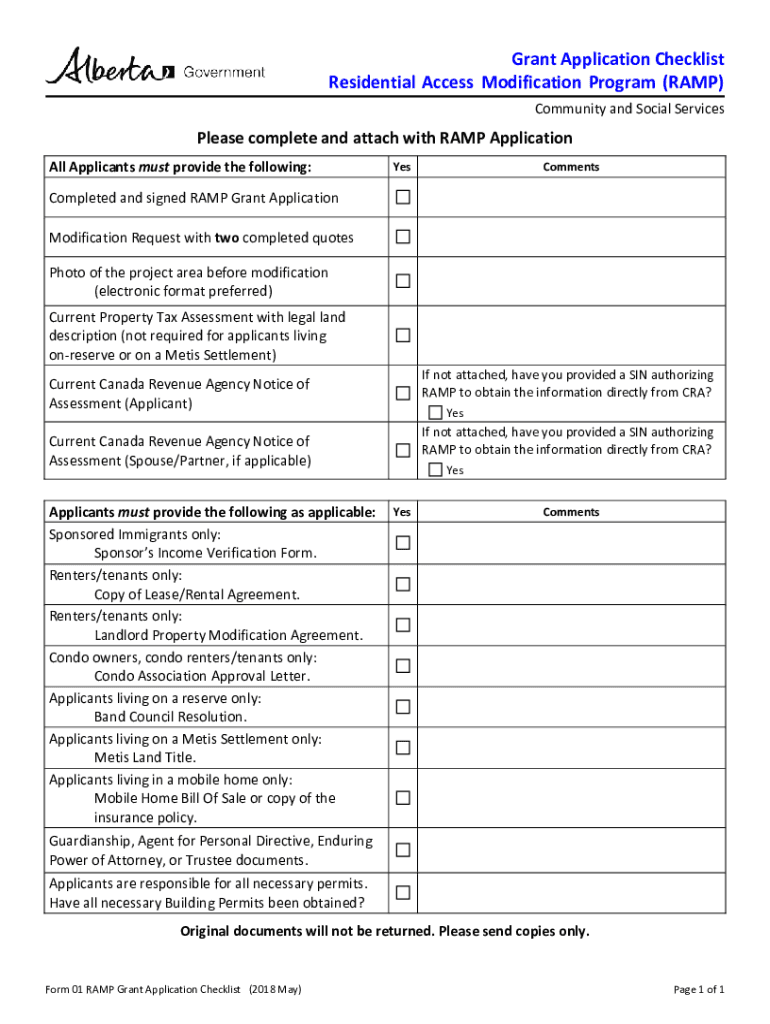
Residential Access Modification Program Grant Application Package This package contains the RAMP grant application form and additional documents. Please refer to the Grant Application Checklist, on.

Open form follow the instructions

Easily sign the form with your finger

Send filled & signed form or save
How to fill out the Ramp Application online
This guide provides a clear and detailed walkthrough on how to complete the Ramp Application online. Designed for ease of use, it will ensure that all necessary steps and components are covered for potential applicants.
Follow the steps to successfully complete your Ramp Application online.
- Click ‘Get Form’ button to access the Ramp Application and open it in an online editor.
- Begin by entering your personal information in the designated fields. This includes your first name, last name, current address, and contact details.
- If applicable, provide information about your spouse or partner, including their personal details and relationship to you.
- For applicants applying on behalf of a child, include the child's full legal name and relevant information.
- Fill out the family income information by providing your current annual gross income and your spouse's income if applicable. If you do not have a Notice of Assessment, you can authorize RAMP to obtain this information from the Canada Revenue Agency using your Social Insurance Number.
- Indicate your mobility situation by selecting the appropriate option that describes your need for modifications due to physical limitations.
- Detail the ownership of the residence you wish to modify. Include any necessary documentation if you are not the homeowner.
- Review the terms and conditions of the grant carefully and sign where indicated, ensuring you have witnesses for signatures if required.
- Before submitting, revisit all sections to confirm that all fields are complete and accurate.
- Finally, save your changes, download a copy of the completed form, and print it if needed. You can share the form or submit it via the channels provided.
Complete your Ramp Application online today to take the first step towards obtaining assistance for residential modifications.
Experience a faster way to fill out and sign forms on the web. Access the most extensive library of templates available.
Related content
2021 RAMP Grant Applications. NEW FORMAT FOR RAMP APPLICATIONS (link below). Please note...
Eligibility. Cut into rusted-steel, backlit and iconic graphics of the Badger Pride Wall...
ogy which is optimum for all applications. Moreover, ... is best for a specific...
Get answers to your most pressing questions about US Legal Forms API.
How does Ramp app work?
Ramp is a cloud-based expense and spend management solution that provides businesses with virtual corporate cards for employees and allows them to track and manage company spending. The platform helps businesses to track trends in spending and identify areas where costs could be cut.
Is Ramp free to use?
Our Ramp Card and expense management software is free to use! Unlike other cards that entice you to spend with complicated reward programs, Ramp is the only card platform built around saving time for you and your team, and keeping money in your bank.
What is a ramp account?
Ramp is a corporate charge card powered by Visa. Businesses are required to pay the monthly balance in full by each statement period. Must have at least $75,000 in cash in any U.S. business bank account to qualify.
What is ramp app?
Ramp is the finance automation platform designed to save you time and money. With Ramp you get corporate cards, expense management, bill payments, accounting automation and reporting—all in one easy-to-use solution.
Is Ramp a bank account?
Ramp is a corporate charge card powered by Visa. Businesses are required to pay the monthly balance in full by each statement period. Must have at least $75,000 in cash in any U.S. business bank account to qualify.
What is the ramp process?
RAMP: Recognize, Assess, Minimize, Prepare.
How does Ramp make money?
Ramp makes money via interchange fees from its card, interest on financing, and the investments it makes. Founded in 2019, Ramp has become one of the fastest-growing companies in the FinTech space. It is currently valued at $8.1 billion.
How do I log into ramp?
Ramp has three main ways that you can authenticate: Log into Ramp.com using your Google SSO company set up. Log into Ramp.com using your companies Okta authentication (you cannot currently log in directly from Okta, but can log in through Ramp.com utilizing Okta authentication)
Use professional pre-built templates to fill in and sign documents online faster. Get access to thousands of forms.
If you believe that this page should be taken down, please follow our DMCA take down process here.
This form is available in several versions. Select the version you need from the drop-down list below.