Loading
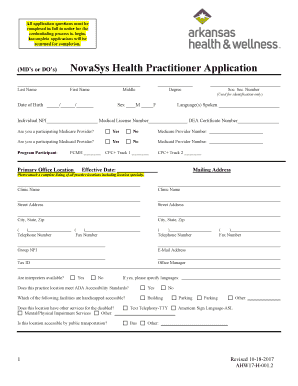
Get Ahw-novasys Health Practitioner Application (mds Or Dos). Novasys Health Practitioner Application
How it works
-

Open form follow the instructions
-

Easily sign the form with your finger
-

Send filled & signed form or save
How to use or fill out the AHW-NovaSys Health Practitioner Application (MDs Or DOs) online
Filling out the AHW-NovaSys Health Practitioner Application is essential for medical doctors and doctors of osteopathy seeking to join the NovaSys health network. Completing the application accurately is crucial to ensure a smooth credentialing process. This guide will walk you through each section of the application.
Follow the steps to successfully complete the AHW-NovaSys Health Practitioner Application
- Press the ‘Get Form’ button to access the application form and open it in your browser.
- Begin by filling out your personal details. Include your last name, first name, middle name, date of birth, degree, and gender. Ensure you enter your social security number, as it is required for identification purposes only.
- Indicate your language proficiencies, followed by your individual National Provider Identifier (NPI), medical license number, and DEA certificate number if applicable.
- Respond to the questions regarding your Medicare and Medicaid participation by selecting ‘Yes’ or ‘No’ and provide the respective provider numbers if relevant.
- Complete the program participant section by marking the appropriate options (PCMH, CPC+ Track 1, CPC+ Track 2) and state the effective date of your participation.
- Provide your primary office location by naming the clinic, entering its street address, city, state, and zip code. Include your clinic's telephone and fax numbers as well as your group NPI, email address, and tax ID number.
- Detail the office manager's name and answer whether interpreters are available. If interpreters are available, specify the languages offered.
- Indicate if the practice meets ADA accessibility standards and note the facilities that are handicapped accessible, including any additional services for individuals with disabilities.
- State if you are accepting new patients and mention any restrictions regarding age or gender, if applicable, along with your office hours for each day of the week.
- Provide the billing information, ensuring it matches locator 33 on the HCFA 1500 form, and complete the corresponding W9 form.
- Fill out the admitting privileges section, naming the primary admitting facility and noting your status (active or other).
- Describe your primary and specialty care information with taxonomy details and call coverage availability.
- List your appointment availability for routine, preventive, urgent, and emergency care appointments.
- Detail after-hours telephone service for your practice and note any services provided, such as lab or radiology services, and whether these are on-site or offsite.
- Answer the malpractice claims history section accurately, providing all required information if applicable, including any pending claims or lawsuits.
- Complete the health status questions, providing further explanations for any affirmative responses in attached documents.
- Sign and date the provider attestation and release authorization part of the application to affirm that all information is accurate and complete.
- Once the entire application is filled, review all entries for completeness and accuracy. Save your changes, then download, print, or share the completed form.
Submit your completed AHW-NovaSys Health Practitioner Application online to move forward in the credentialing process.
Industry-leading security and compliance
US Legal Forms protects your data by complying with industry-specific security standards.
-
In businnes since 199725+ years providing professional legal documents.
-
Accredited businessGuarantees that a business meets BBB accreditation standards in the US and Canada.
-
Secured by BraintreeValidated Level 1 PCI DSS compliant payment gateway that accepts most major credit and debit card brands from across the globe.