Loading
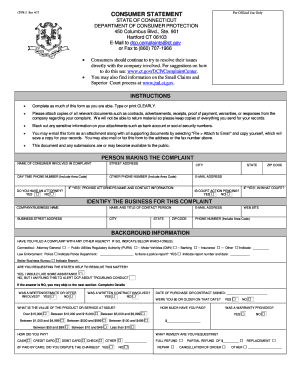
Get Cpfr-2 Rev 4/17
How it works
-

Open form follow the instructions
-

Easily sign the form with your finger
-

Send filled & signed form or save
How to fill out the CPFR-2 Rev 4/17 online
Completing the CPFR-2 Rev 4/17 form online is a straightforward process that allows users to file a consumer complaint with the Department of Consumer Protection in Connecticut. This guide will assist you through each section and field of the form, ensuring that you provide the necessary information clearly and accurately.
Follow the steps to complete the CPFR-2 Rev 4/17 form online.
- Click ‘Get Form’ button to access the CPFR-2 Rev 4/17 form and initiate the online completion process.
- Fill in the personal information section, including your name, street address, phone numbers, and email address. Ensure your information is clear and legible.
- Indicate whether you have legal representation by selecting 'Yes' or 'No' for the attorney’s question. If applicable, provide the attorney's name and contact information.
- Identify the business involved in your complaint by entering the company name, contact person, address, email, phone number, and website.
- Provide background information by indicating whether you have filed complaints with other agencies. Select any relevant options and provide additional necessary information about police involvement, if applicable.
- Answer the questions regarding the nature of your complaint, including whether a written estimate or contract was involved, the value of the product or service, and how payment was made.
- In the complaint details section, describe the product or service involved in your complaint, how it differed from expectations, and any communication you had with the company. Include the date of contact and response from the business.
- Attach any supporting documentation by checking the relevant boxes for the documents you are including to support your complaint.
- Sign and date the form to verify that the information provided is accurate. Remember that all complaints are public information.
- After completing the form, you can save your changes, download the form, print it, or share it as required.
Complete your consumer complaint online by following the steps outlined above.