Loading
Get Faa Form 337
How it works
-

Open form follow the instructions
-

Easily sign the form with your finger
-

Send filled & signed form or save
How to fill out the Faa Form 337 online
Filling out the Faa Form 337 is an essential task for documenting major repairs and alterations to aircraft. This guide will walk you through the process of completing the form online, ensuring that you have all the necessary information at hand.
Follow the steps to successfully fill out the Faa Form 337 online.
- Click 'Get Form' button to obtain the form and open it in your preferred editing tool.
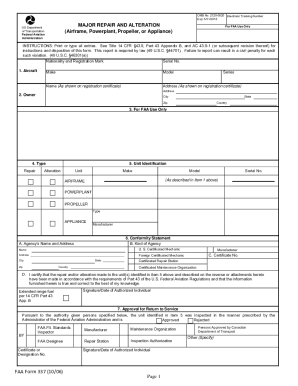
- Begin by completing the aircraft information section. Provide the nationality and registration mark, serial number, make, model, and owner details as shown on the registration certificate.
- In the 'Owner' section, include the owner's address, city, state, zip code, and country to ensure accurate identification.
- For 'FAA Use Only,' leave this section blank, as it is designated for official use after your submission.
- Proceed to the unit identification section. Specify the type of work (repair or alteration) and fill in the unit make, model, and serial number as described in item 1.
- Complete the 'Conformity Statement' by entering the agency's name, address, and type before providing a signature and date from the authorized individual certifying the work.
- In the 'Approval for Return to Service' section, ensure that the inspector or designee's information is filled in, including the signature and date to validate that the unit was inspected.
- Describe the work accomplished in detail. If you require additional space, attach extra sheets labeled with the aircraft nationality and registration mark along with the date of completion.
- Once all sections are filled out accurately, save your changes, and proceed to download or print the form as needed.
Start completing your Faa Form 337 online to ensure your aviation records are up to date.
In a DNS file, the "@" symbol is a placeholder used to represent "the current domain". The @ symbol in your DNS record refers to the record for your domain name without any or sub-domain name.