Loading
Get Fax: 1-888-436-8320
How it works
-

Open form follow the instructions
-

Easily sign the form with your finger
-

Send filled & signed form or save
How to fill out the Fax: 1-888-436-8320 online
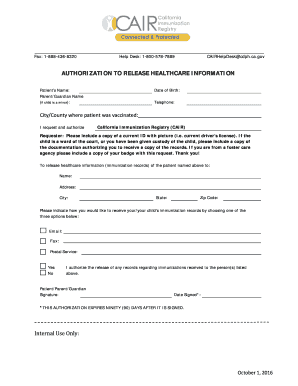
This guide provides clear, step-by-step instructions on how to fill out the Fax: 1-888-436-8320 online. It is designed to assist users in completing the authorization to release healthcare information form with ease.
Follow the steps to complete the form accurately.
- Locate and click the 'Get Form' button to access the form and open it for editing.
- Enter the patient's name in the designated field. Ensure the name is spelled correctly as it appears on official documents.
- If the patient is a minor, provide the name of the parent or guardian in the specified section.
- Input the patient's date of birth in the format required, typically MM/DD/YYYY.
- Provide a contact telephone number for the patient or guardian in the relevant field.
- Indicate the city or county where the patient was vaccinated. Fill this information in the provided line.
- In the authorization section, specify the requestor's details by entering the name and address of the individual or agency who will receive the healthcare information.
- Choose your preferred method of receiving the immunization records by selecting either email, fax, or postal service.
- Sign the form as the patient or as a parent/guardian, providing the necessary signature in the designated area.
- Date the form by entering the current date in the provided field.
- Review all entries for accuracy and completeness before finalizing your document.
- Once finalized, save your changes, then download, print, or share the form as needed.
Complete your documents online with confidence and ensure your healthcare information is authorized for release.
Participation in CAIR is required for all healthcare providers administering immunizations and is open to healthcare providers, county welfare departments, foster care agencies, WIC service providers, and health care plans.