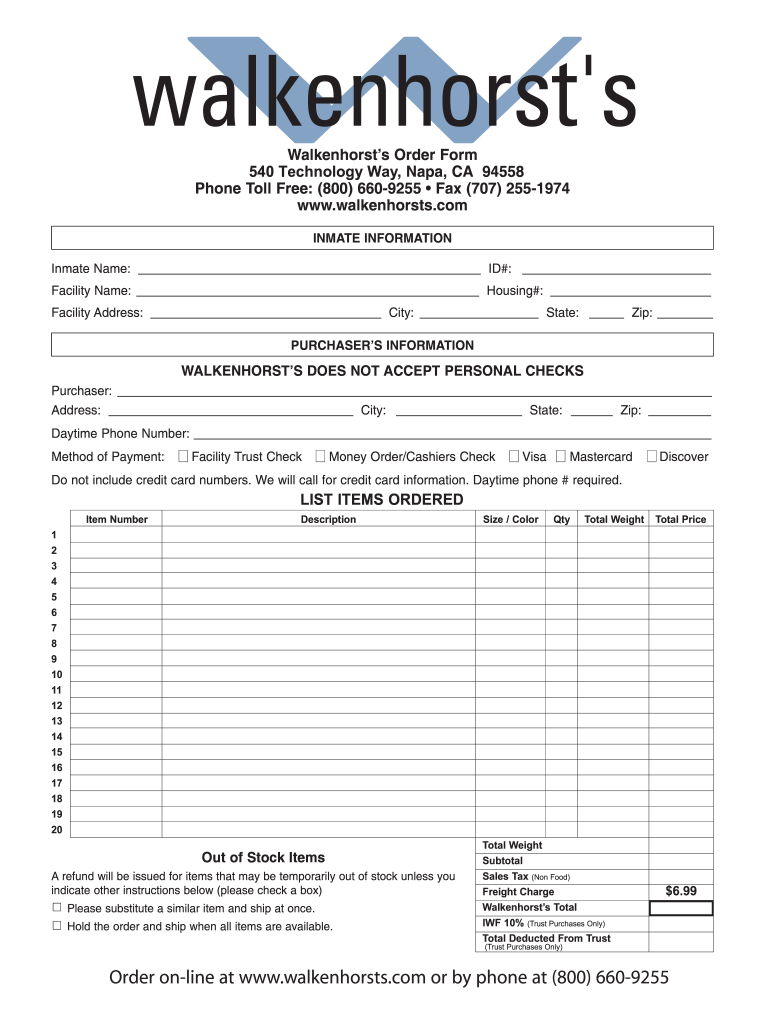
N-line at www.walkenhorsts.com or by phone at (800) 660-9255 .

Open form follow the instructions

Easily sign the form with your finger

Send filled & signed form or save
How to fill out the Walkenhorst’s Order Form online
Filling out Walkenhorst’s Order Form online can be a straightforward process if you follow the steps outlined in this guide. This comprehensive walkthrough will assist you in accurately completing the form with confidence.
Follow the steps to fill out Walkenhorst’s Order Form online
- Click ‘Get Form’ button to obtain the form and open it in an accessible format.
- Begin by entering the inmate information in the designated fields. Provide the inmate's name, ID number, facility name, housing number, and the facility address, ensuring every detail is correct.
- Next, provide the purchaser’s information. Fill in your name, address, city, state, and zip code. Additionally, include your daytime phone number, as this information is necessary for processing the order.
- Select the method of payment from the available options. Ensure you understand that personal checks are not accepted and that you will need to provide credit card information via a phone call after the form submission.
- List the items you wish to order in the section provided. Include the item number, description, size/color, quantity, total weight, and total price for each desired item.
- Indicate any preferences for out-of-stock items by checking the appropriate box. Choose between receiving a refund or substituting a similar item.
- Calculate and fill out the total weight, subtotal, sales tax (if applicable), freight charge, and the total amount due, including any deductions from the trust balance if relevant.
- Once all fields are filled out accurately, review your entries for any errors or omissions. After confirming everything is correct, save the changes, and opt to download, print, or share the form as needed.
Complete and submit your order form online today for a seamless experience with Walkenhorst's services.
Experience a faster way to fill out and sign forms on the web. Access the most extensive library of templates available.
Related content
YOU MUST CREATE AN ACCOUNT TO USE ANY OF THE BELOW ORDERING. METHODS. • Telephone. •...
Fill out the form and we will mail a catalog to you. Webmaking the process of sending...
Get answers to your most pressing questions about US Legal Forms API.
How do I write to a federal inmate?
Writing to a federal inmate involves understanding the correct mailing procedures. Start by addressing the letter to the inmate using their full name and inmate number, along with the appropriate facility address. Use a plain envelope and avoid including any items that may contravene facility rules. Additionally, you can use the Walkenhorst’s Order Form if you plan to include items or packages with your letter, ensuring you adhere to all guidelines.
How do I order for Walkenhorst?
To order for Walkenhorst, visit their official website and navigate to the area designated for inmate orders. You can select from various items and packages tailored for federal inmates. Add the chosen items to your cart and proceed to checkout by filling out the Walkenhorst’s Order Form accurately. Be sure to check all information for correctness to ensure timely delivery.
How to fill out USPS customs form for APO address?
To fill out a USPS customs form for an APO address, start by writing the complete APO address, including the city and country. Next, accurately describe the contents of your package, providing details such as the item type, value, and weight. Ensure you complete any necessary declarations about the contents, and remember to sign and date the form. Consider using the Walkenhorst’s Order Form if you're sending items to a federal inmate, as it can simplify the process.
How to fill out a federal visitation form?
Filling out a federal visitation form involves a few crucial steps. First, gather all necessary information about yourself and the inmate, such as names, identification numbers, and contact details. Make sure to provide accurate information without omissions to avoid delays in processing. After completing the form, review it carefully before submitting it to ensure everything is correct.
How does federal visitation work?
Federal visitation allows friends and family to visit inmates in federal correctional facilities. Each facility has specific rules regarding visiting hours, the number of visitors allowed, and security procedures. To ensure a smooth visit, familiarize yourself with the facility's policies and complete any required paperwork ahead of time. You may also need to fill out a Walkenhorst’s Order Form for specific packages or items you wish to send to the inmate.
How to fill out a federal inmate visitation form?
To fill out a federal inmate visitation form, start by gathering the necessary information about the inmate, including their full name, inmate identification number, and the facility where they are located. You'll also need to provide your personal information, such as your name, address, and relationship to the inmate. Once you have all this information, you can complete the form accurately. After filling it out, ensure you submit it according to the guidelines provided by the facility.
What payment methods does Walkenhorst accept?
Walkenhorst accepts several payment methods such as Visa, MasterCard, and PayPal. You can enter your payment details seamlessly during the checkout process on the Walkenhorst’s Order Form. This variety of options makes it convenient for customers to finalize their purchases.
What is the return policy for Walkenhorsts?
Walkenhorst’s return policy allows customers to return items under specific conditions. This includes unopened products or items damaged during transit. It’s essential to review the policy details on their website or contact customer service for clarification before placing your order.
Can I request a printed Walkenhorst catalog?
Yes, you can request a printed Walkenhorst catalog by contacting their customer service. They will guide you through the process of obtaining a physical copy of their catalog. This can be helpful if you prefer to browse products before using the Walkenhorst’s Order Form online.
How do I buy food for an inmate?
To buy food for an inmate, visit the Walkenhorst’s Order Form and follow the instructions for food purchases. Ensure you have the correct inmate information and use the available options on the form to select appropriate items. Completing your order through the form is simple and secure.
Use professional pre-built templates to fill in and sign documents online faster. Get access to thousands of forms.
If you believe that this page should be taken down, please follow our DMCA take down process here.