Get Rotc Cadet Command Form 131-r 1999-2026
How it works
-

Open form follow the instructions
-

Easily sign the form with your finger
-

Send filled & signed form or save
How to fill out the ROTC Cadet Command Form 131-R online
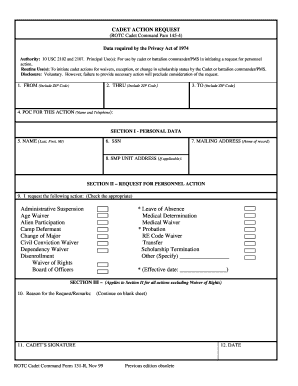
Filling out the ROTC Cadet Command Form 131-R is an essential step for cadets and battalion commanders in managing personnel actions. This guide provides clear, step-by-step instructions designed to support users through the online completion of the form.
Follow the steps to successfully complete the form online.
- Click ‘Get Form’ button to obtain the form and open it in an editable format.
- In the 'FROM' section, include your complete address, including the ZIP code. This is important for proper identification and correspondence.
- In the 'THRU' section, indicate the name and address of the person or office the request is being submitted through, including the ZIP code.
- In the 'TO' section, provide the name and address of the intended recipient of this personnel action request, along with the ZIP code.
- For 'POC FOR THIS ACTION', list the name and contact number of the person who can provide further information regarding the request.
- In SECTION I - PERSONAL DATA, fill in your full name as it appears on official documents with Last, First, and Middle Initial.
- Provide your mailing address, which should be your home of record, ensuring all details are accurate.
- If applicable, enter the address of your Senior Military Program (SMP) unit in the designated field.
- In SECTION II – REQUEST FOR PERSONNEL ACTION, select the specific action you are requesting by checking the appropriate box.
- If your action requires it, specify other actions in the 'Other' field, and indicate the effective date if necessary.
- In SECTION III, provide the reason for your request in the designated 'Reason for the Request/Remarks' section, using additional sheets if necessary.
- Sign and date the form where indicated, ensuring that your signature is clear.
- Proceed to fill out the Battalion Commander/PMS Certification section, where the commander will review and certify the information, providing their recommendation.
- The Commander/Authorized Representative will type their name and sign the form as required.
- In SECTION IV, provide any remarks relevant to the request for waiver of rights, including pertinent documentation if required.
- Once the form is fully completed, review all entries for accuracy. Users can save changes, download, print, or share the form as needed.
Complete your ROTC Cadet Command Form 131-R online today to ensure your request is processed efficiently.
Completing four years of ROTC offers numerous benefits, especially if you aspire to a military career. You will receive leadership training, mentorship, and hands-on experiences that are valuable for both military and civilian paths. Additionally, as a graduate, you will commission as an officer, unlocking advanced career opportunities. Utilizing the ROTC Cadet Command Form 131-R is the first step to gaining these experiences and ensuring that you maximize your potential.