Loading
Get Belterra Casino Resort
How it works
-

Open form follow the instructions
-

Easily sign the form with your finger
-

Send filled & signed form or save
How to fill out the Belterra Casino Resort credit card authorization form online
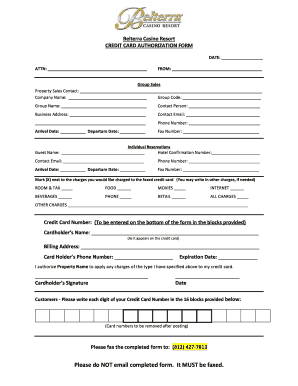
Filling out the Belterra Casino Resort credit card authorization form is a straightforward process that enables you to authorize expenses associated with your stay. This guide will walk you through each section of the form to ensure that all necessary details are accurately completed.
Follow the steps to successfully complete your credit card authorization form.
- Click ‘Get Form’ button to obtain the credit card authorization form and open it in the editor.
- Fill in the date at the top of the form. This indicates when you are submitting the authorization.
- Provide the attention designation, if applicable, to ensure it reaches the right department.
- Enter your full name in the 'From' section to identify yourself as the person authorizing charges.
- Complete the group sales section, including the property sales contact and company name. Include your group code and group name if relevant.
- Fill out the contact person’s information, including their business address, email, and phone number.
- Indicate your arrival and departure dates clearly to inform the hotel of your reservation timeline.
- Proceed to the individual reservations section. Enter the guest's name, hotel confirmation number, contact email, phone number, and their specific arrival and departure dates.
- Specify which charges you want authorized by marking (X) next to the relevant options, including room & tax, food, movies, internet, beverages, phone, retail, all charges, or any other charges.
- Enter the credit card number in the designated area provided at the bottom of the form, following the correct placement of digits as requested.
- Fill in the cardholder’s name exactly as it appears on the credit card, and provide the billing address.
- Add the cardholder's phone number, expiration date, and provide an electronic signature where requested.
- Once completed, fax the form to (812) 427-7813 as instructed, avoiding email submission.
Begin completing your credit card authorization form online now for a seamless experience!
Belterra reopens after 'water issue' — The Belterra has reopened after the Indiana temporarily closed due to a water issue over the weekend. In a Facebook post on Monday, Belterra says the building has reopened.