Loading
Form preview
  • US Legal Forms
  • Other Templates
  • More Forms
  • More Uncategorized Forms
  • This Form Should Only Be Used For Applications For The Prudential

Get This Form Should Only Be Used For Applications For The Prudential

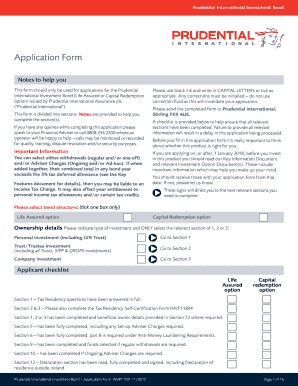
Prudential International Investment BondApplication Form Notes to help you This form should only be used for applications for the Prudential International Investment Bond (Life Assured or Capital.

How it works

  1. Open form

    Open form follow the instructions

  2. Easily sign form

    Easily sign the form with your finger

  3. Share form

    Send filled & signed form or save

How to fill out the This Form Should Only Be Used For Applications For The Prudential online

Filling out the Prudential application form requires careful attention to detail. This guide will walk you through each section of the form, ensuring a smooth and accurate submission.

Follow the steps to complete your application efficiently.

  1. Click ‘Get Form’ button to obtain the application form and open it in the editor.
  2. Begin with the section titled 'Important Information'. Review and understand the implications of your application choice, whether it is for a Life Assured or Capital Redemption option.
  3. Proceed to the 'Ownership details' section. Identify the type of investment (personal, trust, or company) and select the relevant section. Tick only one box appropriately.
  4. Complete 'Section 1 – Personal investment', if applicable. Provide information for each applicant, including name, address, date of birth, nationality, and any existing policies with Prudential International.
  5. If selecting a Trust or Trustee investment, fill out 'Section 2' by providing details about the trust, including trustee information and tax residence.
  6. For company investments, navigate to 'Section 3'. Enter the company details, including company name, tax residence, and directors.
  7. Move to 'Section 5' where you detail your investment amount and any adviser charges. Ensure accuracy in calculations, and include your total investment minus adviser charges.
  8. In 'Section 6', specify the payment details and the source of wealth to comply with Anti-Money Laundering regulations. This is essential for processing your application.
  9. For 'Section 7', choose your preferred currency for different aspects of the bond. This includes investment currency and payment currency.
  10. In 'Section 8', select your investment funds and specify the percentages of total investment. Ensure the total equals 100%.
  11. If you wish to take regular withdrawals, complete 'Section 9', specifying amounts, intervals, and fund selection.
  12. If applicable, fill out 'Section 10' regarding ongoing adviser charges. Enter the details as needed including the frequency of payment.
  13. In 'Section 12', carefully read and sign the declaration. Ensure you understand the implications of the application before submitting.
  14. Once all sections are complete, review your form for accuracy. Save your changes, download, print, or share the form as required.

Complete your Prudential application online today to ensure a smooth investment process.

Get form

Experience a faster way to fill out and sign forms on the web. Access the most extensive library of templates available.
Get form

Related content

Prudential Insurance Company of America: No-Action...
Mar 8, 2002 — You assert that the application of these requirements to Prudential's...
Learn more
Evidence of Insurability Form
The entire package should then be given to your employee or member ... Is application...
Learn more
SGLV 8714, Application for Veterans Group Life...
To apply for VGLI, visit www.benefits.va.gov/insurance, or complete the ... OSGLI use only...
Learn more

Related links form

Employer Deposit Statement Of Withholding Tax (PA-501R). Forms/Publications Estate Tax Form 24 F0019 - Page 1 Of 2 Form 091897--NHF

Questions & Answers

Get answers to your most pressing questions about US Legal Forms API.

Contact support

Once the promissory note terms have been accepted, please allow 3-5 business days for the final processing of your loan. A final notification is sent when your funds are ready to be sent. Please expect about 2-3 business days for the funds to settle in your bank account.

Medical Underwriting for Life or Disability The Prudential EOI process combines quick and easy initial screening with the ability to submit further evidence should an individual not clear the initial screening.

How long does it take to receive my funds? If you are registered for our Electronic Funds Transfer (EFT) payment program, you will generally receive the funds in your account within 1-3 business days. If you request a check, you will generally receive it within 3-5 business days.

If you are unable to login to SOL, then please contact the Annuity Service Center at 888-778-2888 to verify if your account is locked. Once the Customer Service Representative provides you a temporary password, clear your cookies, close your browsers, then re-launch browser and begin step 2 below.

Requirements To Show Evidence It will include applicant and diagnosis information as well as employer details. If the insurer requires more details, a specific request will be provided. Any requested information must be provided in full in order for the application to be approved.

EOI is an application process through which you provide information on the condition of your health or your dependent's health in order to be considered for certain types of insurance coverage. EOI is required for any life and/or disability insurance elections.

Personal identification - social security number, date of birth, mailing address, etc. Medical conditions – diagnoses, types of treatment and dates for treatment • Physicians or clinics – names, addresses and phone numbers Once you have the required information, you are ready to begin the process.

The Prudential EOI process combines quick and easy initial screening with the ability to submit further evidence should an individual not clear the initial screening. Under the process, an individual who requires EOI initially completes a "short form." This form provides the initial screening.

Get This Form Now!

Use professional pre-built templates to fill in and sign documents online faster. Get access to thousands of forms.
Get form
If you believe that this page should be taken down, please follow our DMCA take down processhere.
Get This Form Should Only Be Used For Applications For The Prudential
Get form
  • Adoption
  • Bankruptcy
  • Contractors
  • Divorce
  • Home Sales
  • Employment
  • Identity Theft
  • Incorporation
  • Landlord Tenant
  • Living Trust
  • Name Change
  • Personal Planning
  • Small Business
  • Wills & Estates
  • Packages A-Z
  • Affidavits
  • Bankruptcy
  • Bill of Sale
  • Corporate - LLC
  • Divorce
  • Employment
  • Identity Theft
  • Internet Technology
  • Landlord Tenant
  • Living Wills
  • Name Change
  • Power of Attorney
  • Real Estate
  • Small Estates
  • Wills
  • All Forms
  • Forms A-Z
  • Other Templates
  • Legal Hub
  • About Us
  • Help Portal
  • Legal Resources
  • Blog
  • Affiliates
  • Contact Us
  • Delete My Account
  • Site Map
  • Industries
  • Forms in Spanish
  • Localized Forms
  • State-specific Forms
  • Forms Kit
  • Real Estate Handbook
  • All Guides
  • Notarize
  • Incorporation services
  • For Consumers
  • For Small Business
  • For Attorneys
  • USLegal
  • FormsPass
  • pdfFiller
  • signNow
  • altaFlow
  • DocHub
  • Instapage
Form Packages
  • Adoption
  • Bankruptcy
  • Contractors
  • Divorce
  • Home Sales
  • Employment
  • Identity Theft
  • Incorporation
  • Landlord Tenant
  • Living Trust
  • Name Change
  • Personal Planning
  • Small Business
  • Wills & Estates
  • Packages A-Z
Form Categories
  • Affidavits
  • Bankruptcy
  • Bill of Sale
  • Corporate - LLC
  • Divorce
  • Employment
  • Identity Theft
  • Internet Technology
  • Landlord Tenant
  • Living Wills
  • Name Change
  • Power of Attorney
  • Real Estate
  • Small Estates
  • Wills
  • All Forms
  • Forms A-Z
  • Other Templates
Customer Service
  • Legal Hub
  • About Us
  • Help Portal
  • Legal Resources
  • Blog
  • Affiliates
  • Contact Us
  • Delete My Account
  • Site Map
  • Industries
  • Forms in Spanish
  • Localized Forms
  • State-specific Forms
  • Forms Kit
Legal Guides
  • Real Estate Handbook
  • All Guides
Prepared for you
  • Notarize
  • Incorporation services
Our Customers
  • For Consumers
  • For Small Business
  • For Attorneys
Our Sites
  • USLegal
  • FormsPass
  • pdfFiller
  • signNow
  • altaFlow
  • DocHub
  • Instapage
Social Media
Call us now toll free:
+1 833 426 79 33
As seen in:
© Copyright 1999-2026 airSlate Legal Forms, Inc. 17 Station Street, Suite 303, Brookline, MA 02445
  • Your Privacy Choices
  • Terms of Service
  • Privacy Notice
  • Content Takedown Policy
  • Bug Bounty Program