Loading
Get Maktab Application Form - Al-huda Academy
How it works
-

Open form follow the instructions
-

Easily sign the form with your finger
-

Send filled & signed form or save
How to fill out the Maktab Application Form - Al-Huda Academy online
Completing the Maktab Application Form for Al-Huda Academy online is a straightforward process designed to gather essential information about the applicant and their family. This guide provides clear, step-by-step instructions to help you navigate the form with ease.
Follow the steps to fill out the application form effectively.
- Click the ‘Get Form’ button to obtain the application form and open it in a suitable format for editing.
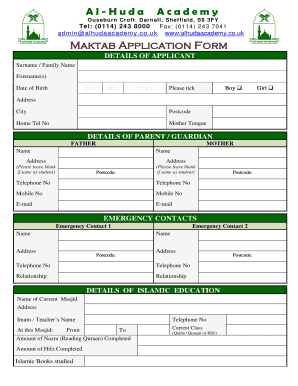
- Begin by filling in the details of the applicant. Include the surname, forenames, and date of birth in the specified fields. For gender, ensure to select either 'Boy' or 'Girl' by ticking the appropriate box.
- Next, enter the applicant's address, city, postcode, and home telephone number. Specify the mother tongue in the provided space.
- Proceed to the details of the parent or guardian sections. Fill in the names, addresses, postcodes, telephone numbers, mobile numbers, and email addresses for both father and mother. Leave the address field blank if it is the same as the student.
- Add emergency contact information by providing the names, addresses, postcodes, telephone numbers, and relationships for two emergency contacts.
- In the section regarding Islamic education, fill in the name of the current masjid, the address, the Imam or teacher's name, the duration of attendance, and their telephone number. Include the amount of Nazra and Hifz completed, as well as the Islamic books studied and the current class.
- For medical details, provide the name and address of the GP, their telephone number, and email. Answer the questions regarding serious or long-term illnesses, allergies, and any current medications. If applicable, include additional information that may help emergency staff.
- Complete the parental approval section by confirming consent for medication and emergency treatment for the applicant. Ensure to print the names and provide signatures for both the applicant and their parent or guardian.
- Finally, review all entered information for accuracy to ensure everything is correct. Make changes if necessary before saving. Once satisfied, save your changes, and download, print, or share the completed form as needed.
Start filling out your Maktab Application Form online now to ensure a smooth application process.