Loading
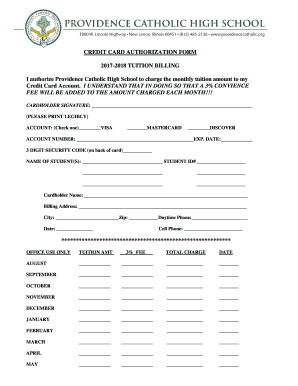
Get Credit Card Authorization Form - Tanzania Embassy
How it works
-

Open form follow the instructions
-

Easily sign the form with your finger
-

Send filled & signed form or save
How to fill out the Credit Card Authorization Form - Tanzania Embassy online
Filling out the Credit Card Authorization Form is a crucial step for ensuring that your payments to the Tanzania Embassy are processed smoothly. This guide provides clear and detailed instructions to support users in completing the form accurately and efficiently.
Follow the steps to complete your form successfully.
- Click ‘Get Form’ button to access the Credit Card Authorization Form and open it for editing.
- In the designated section, authorize the Tanzania Embassy to charge your credit card by signing your name as the cardholder. Please ensure your signature is legible.
- Select the type of credit card you are using by checking one of the boxes labeled 'VISA', 'MASTERCARD', or 'DISCOVER'.
- Provide your credit card account number clearly in the space provided to ensure accurate processing.
- Enter the expiration date of your credit card in the specified format.
- Fill in the three-digit security code located on the back of your card.
- List the names of your student(s) for whom the tuition is being authorized. Include their student ID numbers for verification.
- Complete the cardholder's name field with your legal name as it appears on the credit card.
- Provide your billing address, including city and zip code, ensuring that these details match your credit card statement.
- Enter your daytime phone number for contact purposes, along with your cell phone number.
- Finally, include the date of completion for your records.
- Once all fields are filled out correctly, save the changes, download the form for your records, and print or share it as needed.
Complete your Credit Card Authorization Form online today to ensure timely payment processing.
Related links form
Online Payment with a Debit Card The most convenient payment method for your nonimmigrant visa application (NIV) fee is online with a debit card. Once you log into your profile and while on the payment screen, you can select to pay using a debit card.
Industry-leading security and compliance
US Legal Forms protects your data by complying with industry-specific security standards.
-
In businnes since 199725+ years providing professional legal documents.
-
Accredited businessGuarantees that a business meets BBB accreditation standards in the US and Canada.
-
Secured by BraintreeValidated Level 1 PCI DSS compliant payment gateway that accepts most major credit and debit card brands from across the globe.