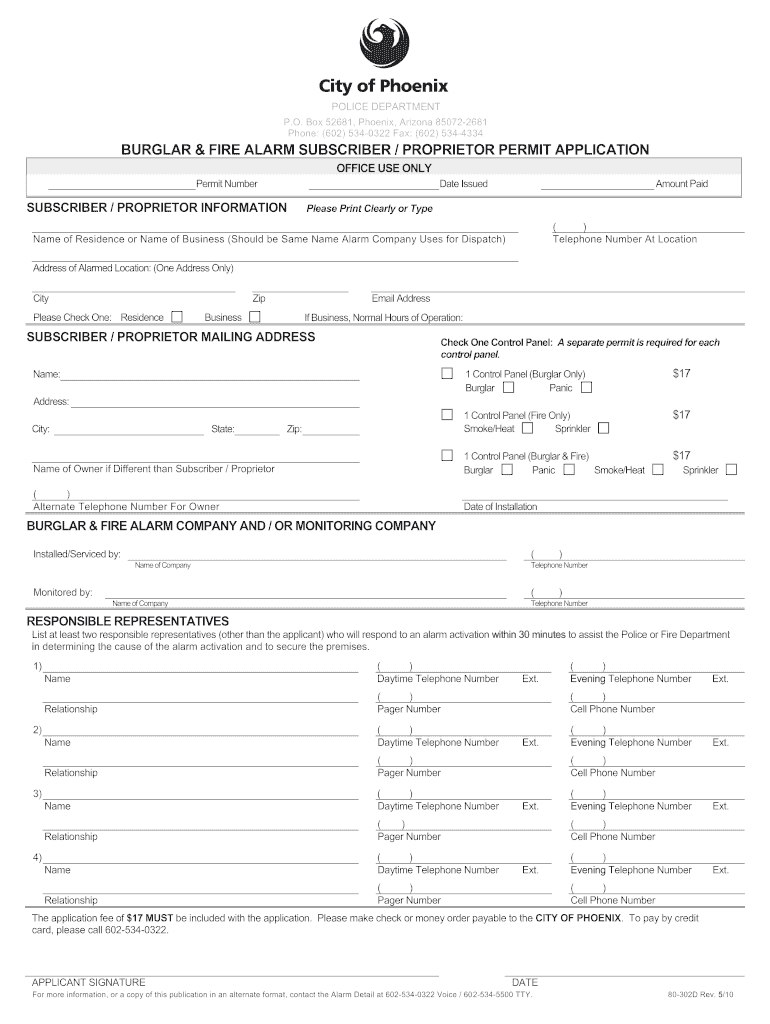
Ddress Only) City Zip Please Check One: Residence Email Address Business If Business, Normal Hours of Operation: SUBSCRIBER / PROPRIETOR MAILING ADDRESS Check One Control Panel: A separate permit is required for each control panel. 1 Control Panel (Burglar Only) Burglar Panic $17 1 Control Panel (Fire Only) Smoke/Heat Sprinkler $17 1 Control Panel (Burglar & Fire) Burglar Panic Smoke/Heat $17 Name of Owner if Different than Subscriber / Proprietor ( ) Alternate Telephone Number For .
Loading

Open form follow the instructions

Easily sign the form with your finger

Send filled & signed form or save
How to fill out the AZ 80-302D online
Filling out the AZ 80-302D form is an essential step for those seeking a burglar and fire alarm subscriber or proprietor permit in Arizona. This guide will provide clear, step-by-step instructions on how to navigate the form effectively.
Follow the steps to complete the AZ 80-302D form online.
- Use the ‘Get Form’ button to access the AZ 80-302D form and open it in your preferred online editor.
- Begin by filling out the subscriber or proprietor information. Clearly print or type the name of the residence or business, ensuring it matches the name used by the alarm company for dispatch.
- Next, provide the complete address of the alarmed location, including city and zip code.
- Indicate whether the alarm is for a residence or a business by checking the appropriate box. If it is for a business, detail the normal hours of operation.
- Fill in the subscriber or proprietor mailing address if different from the alarmed location, and select the type of control panel by checking one of the options provided.
- If the owner differs from the subscriber or proprietor, enter their name and alternate contact number.
- Include the date of installation and provide the name, address, city, state, and zip of the monitoring company or alarm company responsible for installation.
- List at least two responsible representatives who can respond to an alarm activation, along with their daytime telephone numbers and relationship to the subscriber.
- Finally, ensure that you have included the application fee of $17, and opt to pay via check, money order, or by calling the provided number for credit card payments.
- After double-checking all entered information for accuracy, sign and date the application.
- At the end, save your changes, and download, print, or share the completed form as necessary.
Complete your AZ 80-302D form online today for a smooth application process.
Experience a faster way to fill out and sign forms on the web. Access the most extensive library of templates available.
Related content
80-302D Rev. 7/18. POLICE DEPARTMENT. P.O. Box 29122, Phoenix, Arizona 85038-29122. Phone:...
An introduction to the basic forms and the historical development of the religious...
The DG535 is controlled by a Z-80B microprocessor (U303) which is clocked by a. 5MHz...
Use professional pre-built templates to fill in and sign documents online faster. Get access to thousands of forms.
If you believe that this page should be taken down, please follow our DMCA take down process here.
This form is available in several versions. Select the version you need from the drop-down list below.