Edule and tax liability for this quarter. If you are unsure about whether you are a monthly schedule depositor or a semiweekly schedule depositor, see section 8 of Pub. 80. 16 Check one: Line 12 on this return is less than $2,500 or line 12 on the return for the prior quarter was less than $2,500, and you didn’t incur a $100,000 next-day deposit obligation during the current quarter. If line 12 for the prior quarter was less than $2,500 but line 12 on this return is $100,000 or more, you mus.
Loading

Open form follow the instructions

Easily sign the form with your finger

Send filled & signed form or save
How to fill out the IRS 941-SS online
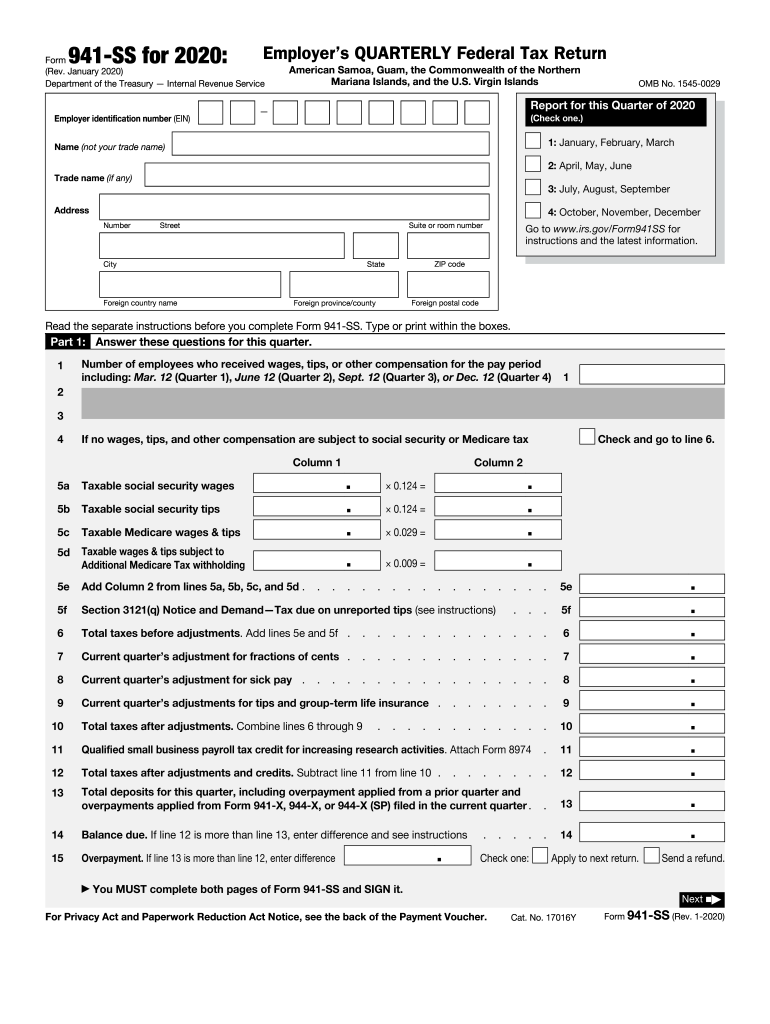
Filling out the IRS 941-SS form is essential for employers in certain territories to report federal employment taxes. This guide provides clear, step-by-step guidance to help users complete the form accurately and efficiently online.
Follow the steps to fill out the IRS 941-SS online.
- Press the ‘Get Form’ button to access the IRS 941-SS form and open it for editing.
- Enter your Employer Identification Number (EIN) in the designated field. This number uniquely identifies your business for tax purposes.
- Select the quarter for which you are reporting by checking the appropriate box for January through March, April through June, July through September, or October through December.
- Provide your name, trade name (if applicable), and complete your business address, including street number, suite, city, state, and ZIP code.
- In Part 1, enter the total number of employees who received wages, tips, or other compensation during the specified pay period. Fill in the taxable social security wages, tips, and Medicare wages in the appropriate columns.
- Calculate the total taxes before adjustments by adding the relevant lines from Part 1. Adjust totals for fractions of cents, sick pay, and specific credits as per your business requirements.
- In Part 2, indicate your deposit schedule and tax liability, selecting whether you are a monthly or semiweekly schedule depositor. Complete any relevant calculations as instructed.
- If applicable, inform if your business has closed or if you are a seasonal employer by checking the appropriate boxes in Part 3.
- If you wish to authorize a designee to speak with the IRS regarding this return, complete Part 4 with the designee's information.
- Finally, sign and date the form in Part 5, affirming the accuracy and completeness of the provided information. Ensure you complete both pages of the form.
Complete your IRS 941-SS form online today for accurate and timely reporting.
Experience a faster way to fill out and sign forms on the web. Access the most extensive library of templates available.
Related content
Feb 19, 2025 — Use Form 941-SS to report social security and Medicare taxes for workers...
Who Must File.—If you have one or more employees, you must file a return for the first...
May 2, 2017 — Check “941” (or “944”) in box b of Form W-3 or check “941-SS”...
Get answers to your most pressing questions about US Legal Forms API.
What is the IRS form 941 SS?
IRS Form 941-SS is a variation of Form 941 used specifically for employers in Puerto Rico, American Samoa, Guam, and the U.S. Virgin Islands. This form is important for businesses operating in these locations to report their federal employment taxes. Completing this form accurately is vital for tax compliance in these regions. US Legal Forms provides tailored resources to help businesses successfully file IRS Form 941-SS.
What is IRS form SS?
IRS Form SS, or the Form 944, is often confused with IRS Form 941 but serves a different purpose. This form is designed for employers with lower payroll tax obligations, allowing them to file annually instead of quarterly. Despite the differences, both forms are essential for tax compliance. Using tools available on US Legal Forms can clarify these options for your business.
Are employers required to file tax returns form 941?
Yes, employers are required to file IRS Form 941 if they have employees. This form reports payroll taxes withheld from employee wages, ensuring proper tax collection. Failure to file can result in significant penalties. US Legal Forms offers resources to assist you with the filing requirements and keep your business compliant.
What is the frequency of 941 filings for an employer?
Employers typically must file IRS Form 941 quarterly. This means employers need to prepare and submit their forms four times a year, aligning with the end of each quarter. Understanding this schedule is essential for accurate payroll reporting. With US Legal Forms, you can find tools to simplify tracking these obligations.
How often do I need to file form 941?
You need to file IRS Form 941 for each quarter of the year. By the end of each quarter, specifically in April, July, October, and January, your form must be submitted. Keeping up with these deadlines is crucial to avoid penalties and ensure compliance. Using the US Legal Forms platform can help streamline this filing process and provide important reminders.
Can you file 941-SS online?
Yes, you can file your IRS 941-SS online using IRS-approved e-filing platforms. This method offers convenience and quicker processing times. Utilizing online filing solutions, such as those available through uslegalforms, can make your tax filing experience more efficient.
How do I submit my 941 to the IRS?
You can submit your IRS 941-SS either electronically or by mailing a printed copy, depending on your preference. If you choose to file electronically, ensure you use an approved provider. This choice can simplify record-keeping and improve accuracy.
Where do I send my 941 to the IRS?
To send your IRS 941-SS, refer to the mailing addresses specified in the form instructions, which vary based on your location and whether you are sending payment. Properly addressing your submission helps expedite processing. Double-check the details to avoid delays.
How do I submit my SS-4 to the IRS?
You can submit your SS-4 application to the IRS by mailing it to the address indicated in the form's instructions. If you need to apply for an Employer Identification Number, you can also submit it online. Accurate submission of your SS-4 will streamline your tax obligations.
How do I send documents to the IRS?
You can send documents to the IRS by mail, using certified mail for proof of delivery. Ensure you include the appropriate forms and cover letter detailing the purpose of your submission. Making sure everything is complete will help facilitate processing.
Use professional pre-built templates to fill in and sign documents online faster. Get access to thousands of forms.
If you believe that this page should be taken down, please follow our DMCA take down process here.
This form is available in several versions. Select the version you need from the drop-down list below.