Loading
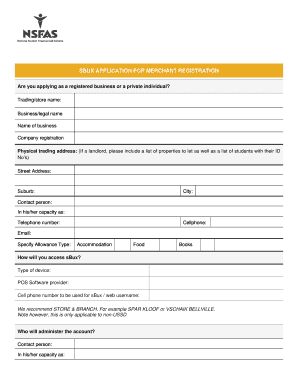
Get Sbux Application For Merchant Registration
How it works
-

Open form follow the instructions
-

Easily sign the form with your finger
-

Send filled & signed form or save
How to fill out the SBUX Application for Merchant Registration online
Filling out the SBUX application for merchant registration online is an essential step for businesses and individuals looking to participate in the sBux payment services. This guide provides clear, step-by-step instructions to help you navigate through the various sections of the application form, ensuring that you provide all necessary information accurately.
Follow the steps to complete your SBUX application seamlessly.
- Click the ‘Get Form’ button to obtain the form and open it for editing.
- Indicate whether you are applying as a registered business or a private individual. Select the appropriate option to ensure your application is processed correctly.
- Enter your trading/store name accurately. This should be the name under which you conduct business.
- Provide your business/legal name as registered officially. This name should match your company registration documents.
- Fill in the name of the business owner. Ensure this aligns with the documents you're submitting.
- Include your company registration number. This should reflect on your business documents.
- Provide the physical trading address, including street address, suburb, and city. If you are a landlord, attach a list of properties to let and a list of students with their ID numbers.
- Identify a contact person within your organization, along with their capacity (role), telephone number, cellphone number, and email for communication purposes.
- Specify the allowance type you will provide (e.g., accommodation, food, or books) to NSFAS students.
- Detail how you will access sBux, including the type of device and the POS software provider.
- Provide the cellphone number to be used for sBux or the web username. Ensure it is correctly entered as this will be used for account creation.
- Designate a person who will manage the account, providing their contact details and ID number. Attach a certified copy of their ID and a letter of authorization.
- Review the authorization declaration, ensuring all provided information is accurate. Sign and date where indicated.
- Submit the completed form to the sBux department via the provided email or fax number. Ensure you send any required attachments as listed in the application form.
- Once submitted, you may save changes, download a copy of your application, print it, or share it as needed.
Start your application for merchant registration online today and join the sBux service.