Loading
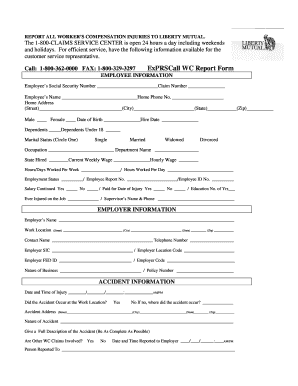
Get Report All Workers Compensation Injuries To Liberty Mutual
How it works
-

Open form follow the instructions
-

Easily sign the form with your finger
-

Send filled & signed form or save
How to fill out the REPORT ALL WORKERS COMPENSATION INJURIES TO LIBERTY MUTUAL online
Filling out the REPORT ALL WORKERS COMPENSATION INJURIES TO LIBERTY MUTUAL is an essential process for reporting workplace injuries. This guide provides clear, step-by-step instructions to help users complete the form accurately and efficiently.
Follow the steps to successfully complete the form.
- Click ‘Get Form’ button to obtain the form and open it in the editor.
- Begin with the employee information section. Enter the employee’s Social Security number and claim number. Fill in the employee’s name, home phone number, and home address (including street, city, state, and zip code). Indicate the employee's gender and date of birth, as well as their hire date.
- Provide details about the employee’s dependents, marital status, occupation, department name, and current weekly wage. Also, include the number of hours/days worked per week and the hours worked per day.
- Add the employment status, employee report number, employee ID number, salary continuance status, and whether the employee has been paid for the date of injury. Include the number of years of education and whether the employee has ever been injured on the job.
- Next, fill out the employer information section. Enter the employer’s name, work location details, and the contact name and telephone number. Include the employer’s SIC, location code, FED ID, and code, as well as the nature of the business and policy number.
- Move on to the accident information. Record the date and time of the injury. Indicate if the accident occurred at the work location, and if not, provide the accident address. Describe the nature of the accident and provide a complete description. Also, note if other WC claims are involved and detail when and to whom the incident was reported.
- For witness information, specify if there were any witnesses. If yes, list their names and contact information.
- Fill in the injury information by identifying which part of the body was injured, the nature of the injury, and the specific location of the injury. Include the injury description and indicate if the employee was hospitalized, and whether there was lost time.
- List the initial medical treatment received. Record the details of the medical facility or professional that treated the injury.
- Use the additional comments and information section to provide any extra details relevant to the incident.
- Finally, enter the name and signature of the person completing the report, as well as their title and phone number.
- Review the completed form for accuracy. Once verified, save changes, download, print, or share the form as needed.
Complete and submit your forms online for prompt assistance with workers' compensation claims.
Standard messaging rates apply. Connect using social: Contact claims by phone: For claims support: 800-225-2467. By mail: Liberty Mutual Group. ATTN: Remittance Processing. 100 Liberty Way. Dover, NH 03821-7500.