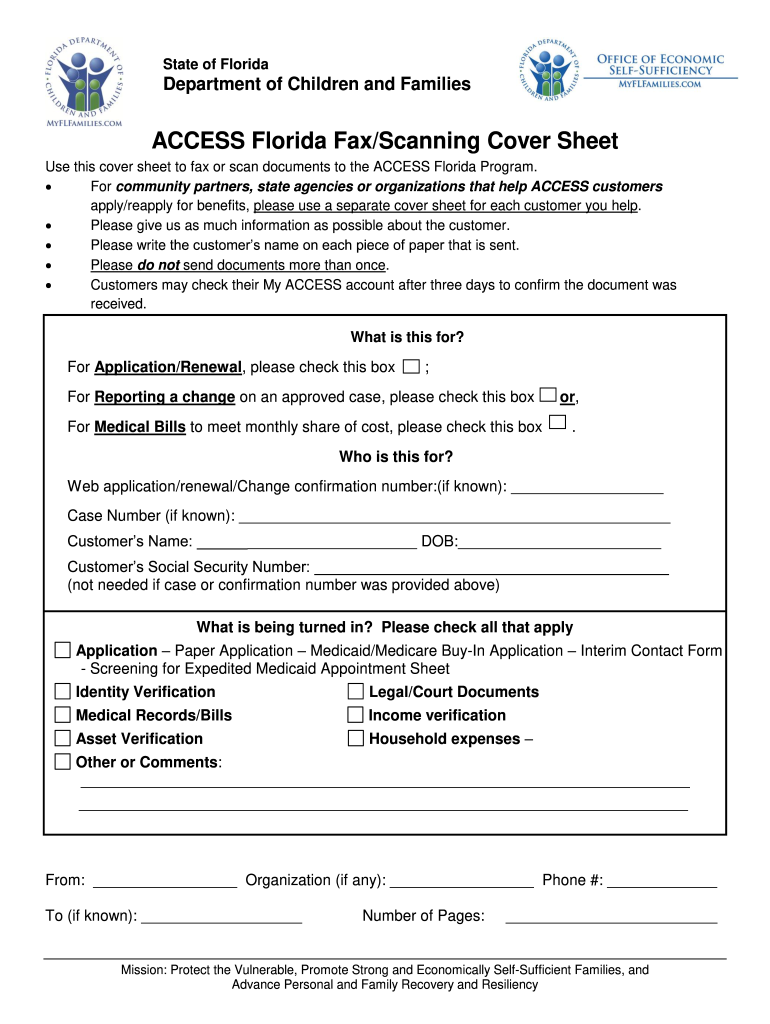
State of Florida Department of Children and Families ACCESS Florida Fax/Scanning Cover Sheet Use this cover sheet to fax or scan documents to the ACCESS Florida Program. For community partners state agencies or organizations that help ACCESS customers apply/reapply for benefits please use a separate cover sheet for each customer you help. Please give us as much information as possible about the customer. Please write the customer s name on each piece of paper that is sent. Please do not send documents more than once. Customers may check their My ACCESS account after three days to confirm the document was received* What is this for For Application/Renewal please check this box For Reporting a change on an approved case please check this box or For Medical Bills to meet monthly share of cost please check this box. Web application/renewal/Change confirmation number if known Case Number if known Customer s Name DOB Customer s Social Security Number not needed if case or confirmation numbe....
Loading

Open form follow the instructions

Easily sign the form with your finger

Send filled & signed form or save
How to fill out the FL ACCESS Florida Fax/Scanning Cover Sheet online
This guide provides clear and concise instructions on how to fill out the FL ACCESS Florida Fax/Scanning Cover Sheet online. Whether you are a community partner, a state agency, or a user submitting documents, this step-by-step approach will help you navigate the process efficiently.
Follow the steps to complete the cover sheet effortlessly.
- Click the ‘Get Form’ button to obtain the FL ACCESS Florida Fax/Scanning Cover Sheet and open it in your preferred editor.
- Identify the purpose of your submission. Check the appropriate box for application/renewal, reporting a change on an approved case, or submitting medical bills.
- Fill in the web application/renewal/change confirmation number if you have it. If not, include the case number if known.
- Enter the customer’s name and date of birth in the designated fields. This information is essential for processing.
- Provide the customer’s Social Security number, unless you have already given the case or confirmation number.
- In the section labeled 'What is being turned in?', check all applicable items that you are submitting. Ensure that all relevant documents are listed.
- Complete the sender’s information with your name, organization (if applicable), and contact number.
- If known, include the recipient's information in the 'To' section.
- Indicate the total number of pages being submitted.
- Review all entries for accuracy. Once confirmed, you can save your changes, download, print, or share the completed cover sheet as needed.
Start filling out your FL ACCESS Florida Fax/Scanning Cover Sheet online today!
Experience a faster way to fill out and sign forms on the web. Access the most extensive library of templates available.
Related content
A centralized resource hub for information on cancer treatment, caregiver tools, and...
The fax cover sheet will be displayed. To view the documents, click the forward button or...
AUTHENTICATOR captures color images and reads full pages to capture and transmit personal...
Get answers to your most pressing questions about US Legal Forms API.
How do I upload documents to my Florida Access account?
To upload documents to your Florida Access account, log in to your account and locate the upload section. You will typically find an option to browse your files and select the documents you wish to upload. Following these steps will ensure your documents are submitted correctly, avoiding the need for a fax cover sheet.
Can I handwrite a fax cover sheet?
While you can handwrite a fax cover sheet, using a printed version is often more professional and easier to read. If you choose to handwrite, ensure all information is clear and legible to avoid confusion when sending your FL ACCESS Florida Fax/Scanning Cover Sheet. Clarity is essential for effective communication.
How to fill out a fax cover sheet example?
For a clear example of how to fill out a fax cover sheet, start by creating a header that includes 'Fax Cover Sheet' and your organization's logo, if applicable. Below, insert your contact details, followed by the recipient's contact information, and include the date. Finally, add a message detailing the contents of the fax to ensure clarity.
What number do you put on a fax cover sheet?
You should put the fax number of the recipient on the fax cover sheet to complete the FL ACCESS Florida Fax/Scanning Cover Sheet correctly. Additionally, include your own fax number in case the recipient needs to reach you. This information is vital for smooth communication through facsimile.
How do I fax a document to Access Florida?
To fax a document to Access Florida, ensure you have your FL ACCESS Florida Fax/Scanning Cover Sheet ready. Next, input the designated fax number provided by Access Florida, attach your documents, and send the fax. Remember to include clear instructions on the cover sheet to expedite processing.
What does attn mean on a fax cover sheet?
The term 'attn' on a fax cover sheet indicates that the document is directed to a specific individual or department. Including 'attn' helps ensure that your FL ACCESS Florida Fax/Scanning Cover Sheet reaches the right person quickly and effectively. It enhances the communication process and minimizes confusion.
How do you fill out a fax cover sheet?
To fill out a fax cover sheet for your FL ACCESS Florida Fax/Scanning Cover Sheet, start by entering your contact information, including your name and fax number. Next, include the recipient's name, fax number, and the date. Finally, provide a brief message or subject line to inform the recipient about the purpose of the fax.
What is a fax cover sheet for?
A fax cover sheet is used to introduce the documents that follow and ensure they go to the right person or department. It provides essential information such as the sender's details, recipient's contact info, and any notes about the content. Using the FL ACCESS Florida Fax/Scanning Cover Sheet can enhance the clarity of your documents and facilitate a smoother processing experience.
What is the fax number for access Florida?
The fax number for Access Florida can differ depending on your location. It's best to check the Florida DCF website or reach out to your regional office for the most accurate information. Remember to use the FL ACCESS Florida Fax/Scanning Cover Sheet to ensure your fax submissions are organized and professionally presented.
How do I report a change on MyACCESS Florida?
To report a change on MyACCESS Florida, log in to your online account or contact your local DCF office. Ensure you have all relevant information available, including your case number. Utilizing the FL ACCESS Florida Fax/Scanning Cover Sheet can help you submit any necessary documentation efficiently.
Use professional pre-built templates to fill in and sign documents online faster. Get access to thousands of forms.
If you believe that this page should be taken down, please follow our DMCA take down process here.