Loading
Get Uk Hmrc Sa700 2018
How it works
-

Open form follow the instructions
-

Easily sign the form with your finger
-

Send filled & signed form or save
How to fill out the UK HMRC SA700 online
Completing the UK HMRC SA700 form is a vital task for non-resident companies liable to income tax. This guide provides a clear, user-friendly approach to successfully navigating each section of the online tax return process.
Follow the steps to accurately complete your tax return
- Press the ‘Get Form’ button to obtain the SA700 form and open it in the editor.
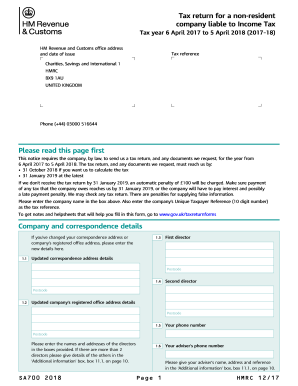
- Begin by entering your company's name in the designated field along with the Unique Taxpayer Reference, which is a 10-digit number required for tax identification.
- Provide any updated correspondence address or registered office address details if applicable. Ensure to include any changes to these addresses in the provided sections.
- Fill in the names and addresses of the company's directors in the corresponding fields. If there are additional directors beyond the two provided sections, include their details in the 'Additional information' box (11.1).
- Indicate whether the company received rental income during the tax year by selecting 'Yes' or 'No.' If 'Yes,' include the relevant partnership names and Unique Taxpayer References in box 11.1.
- If applicable, fill in the details related to furnished holiday lettings, including income and expenses. Complete all fields accurately to reflect the company's financial activities during the year.
- Proceed to the section regarding adjustments to arrive at taxable profit or loss. Enter required figures for income, allowable losses, and any other deductions necessary for accurate reporting.
- In the tax calculation section, indicate if you wish for HMRC to calculate the company’s tax. Complete the fields related to income tax due and payments on account as necessary.
- If applicable, declare whether you would like to claim a repayment of tax, providing details as necessary. The form allows for indications of whether repayments should be made to the company or a nominated individual.
- Complete the declaration by signing the statement at the end of the form. Be sure to provide your name, the date, and your capacity in which you are signing.
- Lastly, review all entered information for accuracy, and once confirmed, proceed to save, download, print, or share the completed form as required.
Start completing your HMRC SA700 form online today.
Get form
Experience a faster way to fill out and sign forms on the web. Access the most extensive library of templates available.
Related links form
Yes, owning a business allows you to claim a tax return if you have overpaid taxes or are eligible for certain reliefs. Understanding deductions for business expenses is crucial, and knowing the requirements, like those outlined in the UK HMRC SA700, can enhance your refund potential. Using platforms like uslegalforms can streamline this process for business owners.
Get This Form Now!
Use professional pre-built templates to fill in and sign documents online faster. Get access to thousands of forms.