Loading
Get Canada Gst21e 2020-2026
How it works
-

Open form follow the instructions
-

Easily sign the form with your finger
-

Send filled & signed form or save
How to fill out the Canada GST21E online
The Canada GST21E form is essential for participants in a joint venture who want to elect to have the operator account for GST/HST. This guide provides a comprehensive step-by-step approach to filling out the Canada GST21E online, ensuring users have the support they need throughout the process.
Follow the steps to complete the Canada GST21E form accurately.
- Click ‘Get Form’ button to obtain the form and open it in the editor.
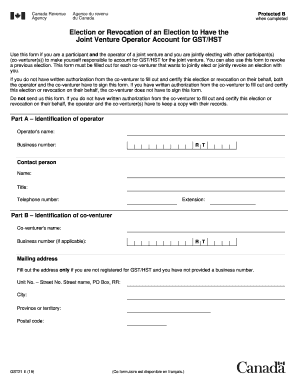
- In Part A, provide the identification details for the operator, including the operator's name and business number. Make sure to fill out the contact person's name, title, telephone number, and extension.
- In Part B, enter the identification details for the co-venturer. Fill in the co-venturer's name and business number if applicable. If not registered for GST/HST, provide the mailing address with the unit number, street number, street name, city, province or territory, and postal code.
- Continue in Part B with the contact person's details for the co-venturer, including their name, title, telephone number, and extension. If there are additional co-venturers, be sure to add an extra page containing this information for each.
- In Part C, indicate the name of the joint venture (if applicable) and describe the joint venture activities that will take place.
- In Part D, enter the effective date of the election for the operator and co-venturer(s) to account for GST/HST. Ensure both the operator and co-venturer(s) certify the information provided by signing the form. Include printed names, titles, telephone numbers, extensions, and the date.
- If you are revoking a previous election, proceed to Part E. Enter the effective date of the revocation and ensure the operator and co-venturer(s) certify the correctness of the information in a similar manner as in Part D.
- Once all sections are filled out, review the form for accuracy. Save the changes, download the form, and keep it for your records. You do not need to send this form to the authorities.
Get started on completing your documents online today.