Loading
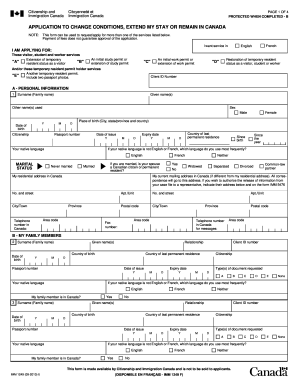
Get Canada Imm 5708 (formerly Imm 1249) 2010
How it works
-

Open form follow the instructions
-

Easily sign the form with your finger
-

Send filled & signed form or save
How to fill out the Canada IMM 5708 (Formerly IMM 1249) online
This guide provides a comprehensive overview of how to successfully complete the Canada IMM 5708 application form online. By following these steps, users can ensure they fill out the form accurately and efficiently.
Follow the steps to fill out the Canada IMM 5708 form online.
- Press the ‘Get Form’ button to access the IMM 5708 form online.
- Begin by entering your personal information in Section A, including your surname, given name(s), date of birth, and citizenship. Ensure accuracy when providing the details as they are essential for your application.
- In Section A, also indicate your marital status and your residential address in Canada. If your mailing address differs from your residential address, fill that in as well.
- Move to Section B to provide information about your family members. For each family member, include their surname, given name(s), date of birth, relationship to you, and citizenship.
- Complete Section C, detailing your original entry to Canada, including dates and places. If applicable, provide details about your most recent entry.
- In Section D, specify whether you want to extend your stay or change conditions for yourself or your family members. Provide details regarding financial support if applicable.
- If there are any additional circumstances relating to your stay or any legal matters, detail these in Section E.
- Review the notice regarding personal information in Section F to understand how your information will be used and shared.
- Finally, in Section G, read and sign the declaration of applicant to confirm that all the information provided is truthful and complete.
- Once you have filled in all necessary fields, save your changes. You can then download, print, or share the form as needed.
Complete your application online now and ensure a smooth process.
Get form
Experience a faster way to fill out and sign forms on the web. Access the most extensive library of templates available.
When answering 'have you previously applied to enter or remain in Canada?', it is essential to be honest and complete. If you have applied before, provide the details including the outcome of previous applications. If you have never applied, simply state that. Clarity and transparency are key, and using platforms like uslegalforms can offer further tips on how to structure your answer.
Get This Form Now!
Use professional pre-built templates to fill in and sign documents online faster. Get access to thousands of forms.