Loading
Get Uob Online Login
How it works
-

Open form follow the instructions
-

Easily sign the form with your finger
-

Send filled & signed form or save
How to fill out the Uob Online Login online
This guide provides a step-by-step process for completing the Uob Online Login form. It aims to support users of all experience levels in navigating the form with confidence and clarity.
Follow the steps to fill out the Uob Online Login form correctly.
- Click the ‘Get Form’ button to obtain the form and open it in the editor.
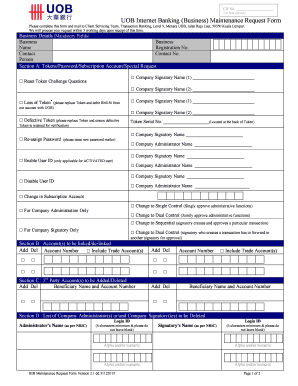
- Begin by entering the mandatory fields in the Business Details section. Provide the business name, registration number, and contact person's details, including their contact number.
- In Section A, indicate any requests related to tokens, passwords, or subscriptions by checking the relevant boxes. If requesting a replacement for a lost or defective token, include the token serial number and company signatory names.
- For linking or de-linking accounts in Section B, add the relevant account numbers and specify any trade accounts to include, if applicable.
- In Section C, add or delete any third-party account beneficiaries by entering their names and account numbers.
- Section D allows you to list company administrators or signatories to be deleted. Provide their login IDs and names as per their NRICs, ensuring you meet the specified character requirements.
- In Section E, list new company administrators with their login IDs, names, NRIC numbers, email addresses, and handphone numbers. Specify if they will have access to the payroll function.
- Similarly, in Section F, add new company signatories, providing the required information just as in Section E.
- Section G requires selecting the type of authorization matrix. Choose only one option that best fits your organization’s needs.
- Once you have filled out all necessary sections, review the form for accuracy. You can then save your changes, download the completed form, print it, or share it as needed.
Complete your Uob Online Login form easily by following the above steps.
I want to reset my username/password Open your TMRW App and tap on "Forgot Username/Password" on your Sign In screen. Enter the required details in the following screen. Enter the One-Time Password (OTP) sent to your registered mobile number. Select the option to enter your Secure PIN.
Industry-leading security and compliance
US Legal Forms protects your data by complying with industry-specific security standards.
-
In businnes since 199725+ years providing professional legal documents.
-
Accredited businessGuarantees that a business meets BBB accreditation standards in the US and Canada.
-
Secured by BraintreeValidated Level 1 PCI DSS compliant payment gateway that accepts most major credit and debit card brands from across the globe.