Loading
Get Parent S Night Out Registration Form - Odschools.org
How it works
-

Open form follow the instructions
-

Easily sign the form with your finger
-

Send filled & signed form or save
How to fill out the Parent S Night Out Registration Form - Odschools.org online
Filling out the Parent S Night Out Registration Form online can be a straightforward process when you follow clear instructions. This guide provides step-by-step guidance to ensure that you complete the form accurately and efficiently.
Follow the steps to complete the registration form seamlessly.
- Press the ‘Get Form’ button to access the Parent S Night Out Registration Form, which will open in an online editor.
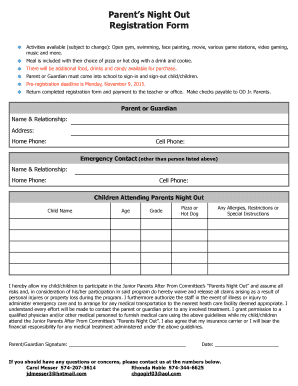
- Enter your name and relationship to the child in the designated fields under the Parent or Guardian section. Provide your home address, home phone number, and cell phone number.
- Fill out the Emergency Contact section by providing the name and relationship of an individual other than yourself, along with their home phone number and cell phone number.
- In the Children Attending Parents Night Out section, list each child's name, age, and grade. Select whether they would like pizza or a hot dog, and indicate any allergies, restrictions, or special instructions.
- Carefully read the waiver statement provided in the form. Sign and date the form in the designated areas to confirm your understanding and acceptance of the terms.
- Once all fields are completed, you can save the changes, download a copy of the form, print it out, or share it as needed.
Complete your Parent S Night Out Registration Form online today and ensure your child's spot for a fun evening!