Loading
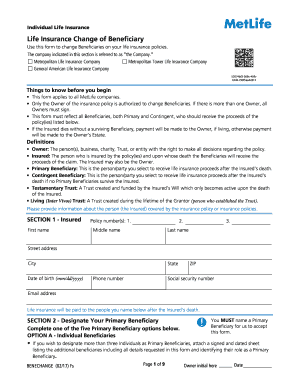
Get Metlife Eforms
How it works
-

Open form follow the instructions
-

Easily sign the form with your finger
-

Send filled & signed form or save
How to fill out the Metlife Eforms online
This guide provides a comprehensive overview and step-by-step instructions on how to fill out the Metlife Eforms online. It is designed for users at all experience levels, ensuring clarity and support throughout the process.
Follow the steps to successfully complete the Metlife Eforms.
- Press the ‘Get Form’ button to retrieve the form and open it for editing.
- Begin with Section 1, providing information about the Insured, including their first name, middle name, last name, address, date of birth, phone number, social security number, and email address.
- Move to Section 2 to designate your Primary Beneficiary. Complete one of the provided options, ensuring you include necessary details like name, address, date of birth, etc. Note that you must name at least one Primary Beneficiary.
- If you have chosen Individual Beneficiaries, specify the percentage of proceeds for each. If you're designating additional beneficiaries, attach a signed sheet with their details.
- Proceed to Section 3 to designate your Contingent Beneficiary if applicable. Repeat the process of specifying percentage distribution and provide all required details as outlined.
- In Section 4, review and check any optional provisions for children or additional requests as needed.
- Complete Section 6 by providing certifications and signatures of Policy Owners. Ensure all necessary signatures are present, including any required witnesses.
- Finally, review all sections for accuracy before submitting the form. Save any changes, download, print or share the completed form as required.
Complete your forms online today for a seamless experience.
Please visit www.brighthousefinancial.com to log on and view your contract details or register your account(s). If you have a Brighthouse Financial pension / annuity benefit through your employer or former employer,Total Control Account, or Trust owned life insurance policy, login here.
Industry-leading security and compliance
US Legal Forms protects your data by complying with industry-specific security standards.
-
In businnes since 199725+ years providing professional legal documents.
-
Accredited businessGuarantees that a business meets BBB accreditation standards in the US and Canada.
-
Secured by BraintreeValidated Level 1 PCI DSS compliant payment gateway that accepts most major credit and debit card brands from across the globe.