Loading
Get Ssa-131 2002-2026
This website is not affiliated with any governmental entity
How it works
-

Open form follow the instructions
-

Easily sign the form with your finger
-

Send filled & signed form or save
How to fill out the SSA-131 online
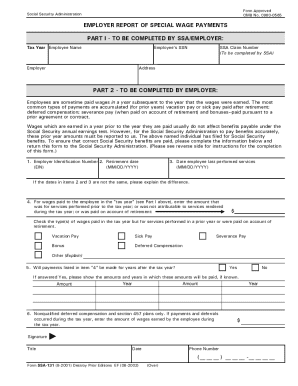
The SSA-131, also known as the employer report of special wage payments, is a crucial form for reporting wages paid to an employee after the tax year. This guide provides step-by-step instructions to help users fill out the SSA-131 online with clarity and ease.
Follow the steps to accurately complete the SSA-131 form online.
- Press the ‘Get Form’ button to obtain the SSA-131 form and open it for editing.
- In Part I, fill in the tax year, employee name, SSA claim number, employee's SSN, employer name, and address as requested.
- Move to Part II, where the employer provides the Employer Identification Number (EIN) and the retirement date of the employee.
- Next, enter the date the employee last performed any services, ensuring it is earlier than or the same as the retirement date.
- State the amount of wages paid in the tax year that relate to services performed in prior years or on account of retirement.
- Indicate which types of wages were paid using the checkboxes provided: vacation pay, sick pay, bonus, severance pay, deferred compensation, or other.
- Answer whether payments listed will occur for years after the tax year, providing amounts and years if applicable.
- For nonqualified deferred compensation and section 457 plans, report the amount of wages earned by the employee during the tax year.
- Finally, sign and date the form, including your title and phone number as the employer.
Take the next step in completing your documentation by filling out the SSA-131 online.
If you get Social Security benefits (retirement, survivors, or disability) or are enrolled in Medicare, you can change your address or direct deposit information online using the My Profile tab in your personal my Social Security account. You can also decide when the change will take effect.