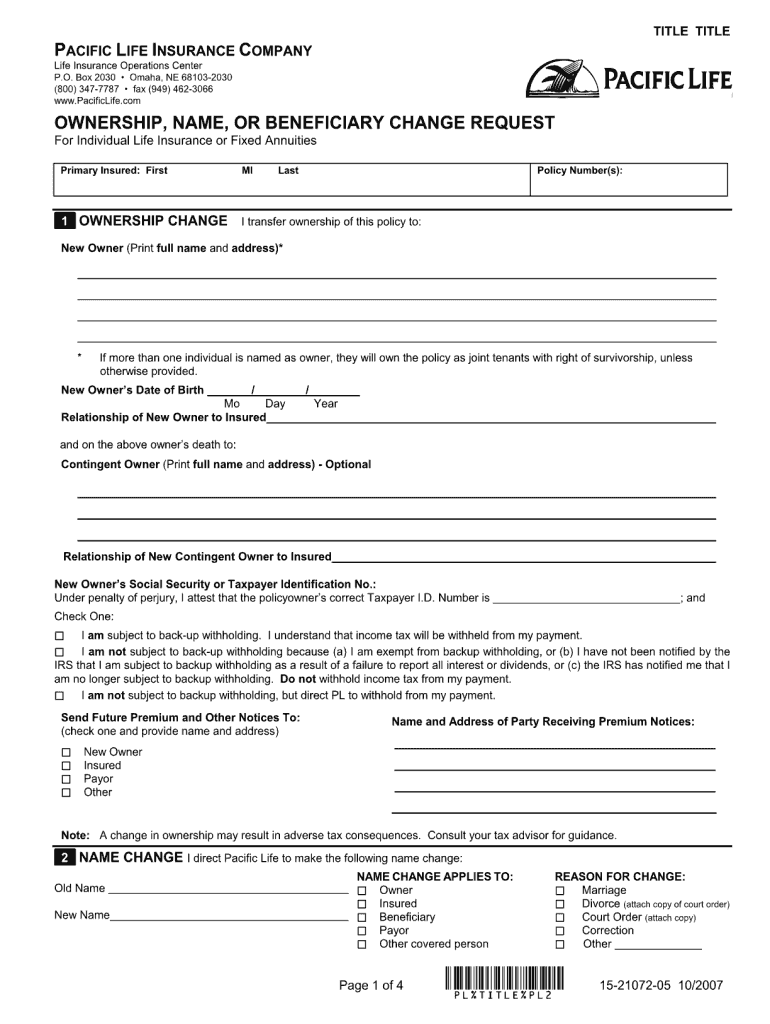
TITLE TITLE PACIFIC LIFE INSURANCE COMPANY Life Insurance Operations Center P.O. Box 2030 Omaha, NE 68103-2030 (800) 347-7787 fax (949) 462-3066 www.PacificLife.com OWNERSHIP, NAME, OR BENEFICIARY.
Loading

Open form follow the instructions

Easily sign the form with your finger

Send filled & signed form or save
How to fill out the Pacific Life 15-21072-05 online
Filling out the Pacific Life 15-21072-05 form online can be a straightforward process when you understand the components involved. This guide will walk you through each section of the form, ensuring that you provide complete and accurate information.
Follow the steps to complete your form accurately.
- Click ‘Get Form’ button to obtain the form and open it in your editor.
- Begin by entering your personal information, such as your full name, address, and contact details in the designated fields. Ensure that you provide accurate and up-to-date information.
- In the next section, indicate your policy preferences or selections as specified. Carefully review each option and select the one that aligns with your needs.
- Provide any additional required information in the fields relating to beneficiaries. It is essential to specify who you wish to designate clearly.
- Review all the information you have entered on the form for accuracy. Make sure there are no typographical errors or omissions.
- Once you have filled out all sections of the form, you may choose to save your changes, download the document for your records, print it, or share it as needed.
Complete your Pacific Life documents online today for a seamless experience.
Experience a faster way to fill out and sign forms on the web. Access the most extensive library of templates available.
Get answers to your most pressing questions about US Legal Forms API.
How do I file a claim with PacificSource?
Filing a claim with PacificSource follows a similar process to that of Pacific Life. Begin by gathering all necessary information and documentation related to your policy. Then, visit their online portal or contact their customer service team for further instructions. Even though these companies may differ, having a clear procedure makes the claim process smoother.
How to fill out a life insurance claim form?
To fill out a life insurance claim form effectively, start by reading the instructions carefully. You can find the appropriate form for your Pacific Life 15-21072-05 online or request one from customer service. Be thorough but concise, providing accurate details about the policyholder and the incident. Also, double-check your submission for completeness to help prevent unnecessary delays.
How long do you have to file a life insurance claim?
Typically, you should file a life insurance claim as soon as possible after the insured event occurs. While time limits can vary by state and policy, most insurers advise completing the claim process within one year. For Pacific Life, particularly under the Pacific Life 15-21072-05, timely filing ensures proper processing and avoids delays. Keeping up with the timeline helps you receive your benefits without complications.
What is the phone number for Pacific Life claims?
If you need to contact Pacific Life to file a claim, the phone number you need is readily available on their official website. This number leads directly to the claims department, where representatives can assist you efficiently. Having your Pacific Life 15-21072-05 policy number on hand will help expedite the process. Don’t hesitate to call if you have questions or need clarification.
How do I file a claim with Pacific Life?
To file a claim with Pacific Life, start by gathering all relevant documentation related to your policy, such as the Pacific Life 15-21072-05. Next, visit their website or contact customer service for detailed instructions. They provide straightforward guidance, ensuring that you have all the required forms and information at hand. Filing a claim does not have to be complicated when you follow their structured process.
Is Pacific Life a good annuity company?
Pacific Life is known for its strong financial stability and range of annuity options. With its Pacific Life 15-21072-05, you can find products tailored to your long-term financial goals. Many customers appreciate the balance of risk and reward in their offerings. Overall, it stands out in the market for reliability and customer service.
What did Pacific Life used to be called?
Pacific Life was originally known as the 'Pacific Mutual Life Insurance Company.' The name was updated to reflect its broader array of financial services. This change marks its evolution while continuing to honor its legacy, as seen with offerings such as the Pacific Life 15-21072-05 feature.
Who owns Pacific Mutual life insurance company?
Pacific Life is a mutual insurance company, meaning it is owned by its policyholders rather than shareholders. This structure allows them to prioritize the interests of their members, resulting in products like the Pacific Life 15-21072-05 feature focusing on customer needs and benefits.
How can I file a claim with Pacific Life?
Filing a claim with Pacific Life is a straightforward process. You can start online by accessing their claims portal, or contact their customer service team for assistance. For claims related to Pacific Life 15-21072-05, it is advisable to have all pertinent documents ready to expedite the process.
What is the slogan of Pacific Life?
The slogan of Pacific Life is 'The Power to Help You Succeed.' This reflects the company's commitment to providing reliable financial products and services, such as the Pacific Life 15-21072-05 feature, designed to help customers secure their financial futures.
Use professional pre-built templates to fill in and sign documents online faster. Get access to thousands of forms.
If you believe that this page should be taken down, please follow our DMCA take down process here.