Loading
Get Provider Billing Form - Mclaughlin Young
How it works
-

Open form follow the instructions
-

Easily sign the form with your finger
-

Send filled & signed form or save
How to fill out the Provider Billing Form - McLaughlin Young online
Filling out the Provider Billing Form - McLaughlin Young is essential for efficient billing and processing of client services. This guide provides clear, step-by-step instructions to assist users in completing the form accurately online.
Follow the steps to complete the Provider Billing Form.
- Click ‘Get Form’ button to obtain the form and open it for completion.
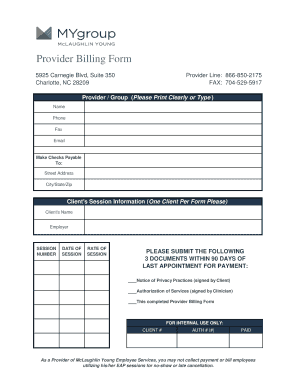
- In the ‘Provider / Group’ section, please print clearly or type the provider or group's name along with their phone number, fax number, and email address.
- Complete the section titled ‘Make Checks Payable To’ by entering the name of the entity or individual to whom checks should be addressed. Fill in the street address, city, state, and zip code.
- In the ‘Client's Session Information’ area, provide information for one client only. Include the client’s full name, their employer's name, session number, date of session, and the rate of the session.
- Ensure to gather and submit the three necessary documents within 90 days of the last appointment for payment: the signed Notice of Privacy Practices by the client, the signed Authorization of Services by the clinician, and this completed Provider Billing Form.
- For internal use, assign a client number and authorization number if applicable, and verify the 'PAID' box is checked once payments have been processed.
- After filling out all required fields, review the form for accuracy. You may then save changes, download the form, print it, or share it as needed.
Complete your documents online for efficient processing today.