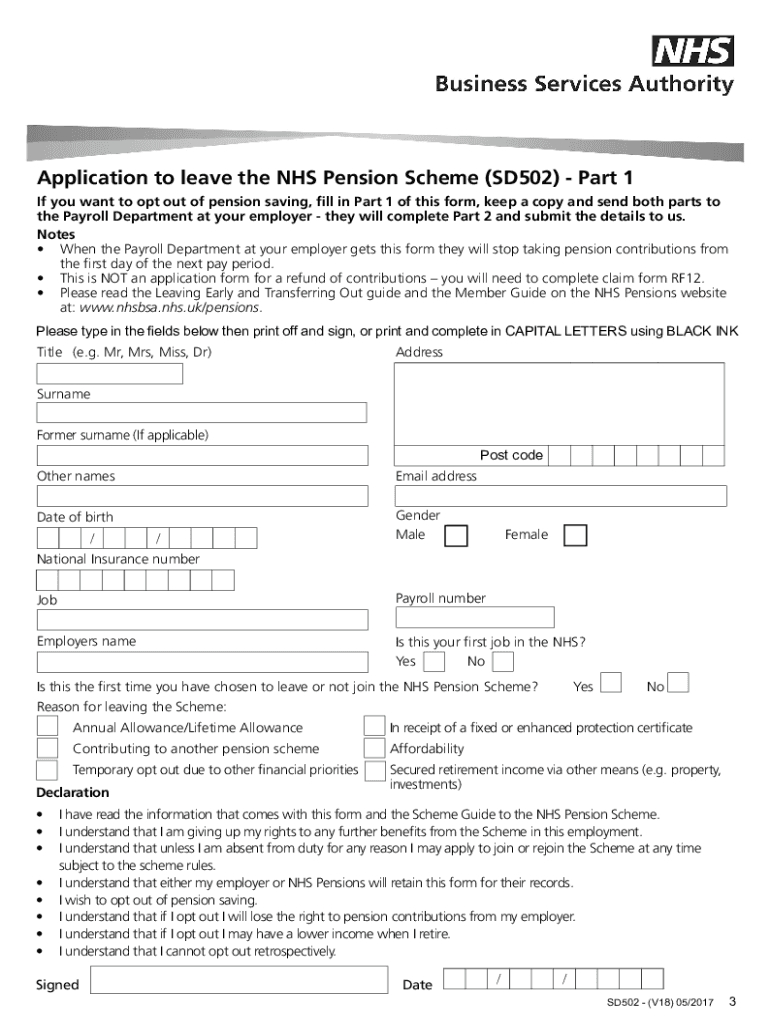
Application to leave the NHS Pension Scheme (SD502) Opting out important information The benefits payable from the NHS Pension Scheme are valuable and anyone considering opting out of the Scheme should.
Loading

Open form follow the instructions

Easily sign the form with your finger

Send filled & signed form or save
How to fill out the Sd502 online
Filling out the Sd502 form online is a crucial step for users who wish to opt out of the NHS Pension Scheme. This guide provides a comprehensive overview and step-by-step instructions to help ensure your form is completed accurately.
Follow the steps to fill out the Sd502 form correctly.
- Press the ‘Get Form’ button to access the document and open it in your online editor.
- In Part 1 of the form, enter your personal details including your title, full address, surname, and previous surname if applicable. Ensure that you fill in all required fields accurately.
- Provide your email address, date of birth, and gender. Fill in your National Insurance number and payroll number, as well as the job title and employer's name.
- Indicate whether this is your first job in the NHS and whether you have previously opted to leave the Pension Scheme. Provide the reason for leaving, selecting the appropriate option from the list provided.
- Read through the declaration section carefully, ensuring that you understand the implications of opting out. Confirm your understanding by checking the relevant statements.
- Sign and date the form in the appropriate fields, ensuring the date is formatted correctly.
- After completing Part 1, make a copy for your records and send both parts of the form to your Payroll Department as soon as possible.
- Ensure to follow any additional instructions provided by your employer regarding the submission and handling of the form.
- Once your application is processed, you will either receive confirmation of your opt-out status or further instructions related to refunds if applicable.
Complete your Sd502 form online today to manage your NHS Pension Scheme status effectively.
Experience a faster way to fill out and sign forms on the web. Access the most extensive library of templates available.
Related content
Docket History. Displaying 4 actions for Bill SD.502. Date, Branch, Action. 1/22/2019...
SD502 provides guidance for the reformatting, transportation, storage and disposal of...
Products Name: SDIO GPS Receiver. Products no.: SD-502. Great SD-502 is the next...
Get answers to your most pressing questions about US Legal Forms API.
When can I opt out of SD502?
If you wish to opt out from the start of your NHS employment you must complete form SD502 within the first month. Your right to any further benefits from the Scheme in this employment. A pension payable for life fully guaranteed by the Government.
How do I opt out of NHS pension SD502?
To opt out, you must complete the application to leave the NHS Pension Scheme (SD502) form (PDF: 219KB). You and your NHS employer must complete the form. This is the only way to opt out of the NHS Pension Scheme.
Can I opt back in to NHS Pension?
If you leave pensionable employment and take benefits from the scheme, you can only rejoin the 2008 Section up to 1 April 2022 if you meet this criteria: You return before age 75. You have not transferred your NHS Pension to another provider. You have not received a refund of your contributions.
What is SD502 form?
If you wish to opt out from the start of your NHS employment you must complete form SD502 within the first month. Benefits you will be giving up if you opt out of the NHS Pension Scheme. • Your right to any further benefits from the Scheme in this employment. •
How do I opt out of NHS Pension auto Enrolment?
Q How does an employee opt out of the NHS Pension Scheme? A They must complete and sign the form SD502 and return this to their employer. A request to opt out that is made by letter, email or made verbally will not be accepted.
How do I claim back my NHS pension form?
If you're in active NHS employment, submit this to your employer. If you have more than one NHS employer, you only need to submit one RF12 form. This must go to the most recent employer to which the refund period relates. If you're no longer paying into the NHS Pension Scheme, send your RF12 form to NHS Pensions.
What company is NHS pension?
We administer the NHS Pension scheme on behalf of the Department of Health and Social Care. As the largest centrally administrated pension scheme in Europe, it has 3.4 million members across England and Wales and makes payments to NHS pensioners of over £12 billion annually.
Do you have to opt in to NHS Pension?
It is possible to submit a written election to opt-out of the NHS pension scheme for future service. If you have two or more years qualifying scheme membership this will result in you being treated as a deferred member of the scheme, in the same way as if you had left pensionable service with your employer.
Use professional pre-built templates to fill in and sign documents online faster. Get access to thousands of forms.
If you believe that this page should be taken down, please follow our DMCA take down process here.