Loading
Get Formulario Inscripcion Cursos Cortos.doc
How it works
-

Open form follow the instructions
-

Easily sign the form with your finger
-

Send filled & signed form or save
How to use or fill out the FORMULARIO INSCRIPCION CURSOS CORTOS.doc online
Filling out the FORMULARIO INSCRIPCION CURSOS CORTOS.doc online is a straightforward process designed to help you complete your application efficiently. This guide will walk you through the essential steps and components of the form to ensure you provide the necessary information accurately.
Follow the steps to successfully complete your form:
- Click ‘Get Form’ button to access the form and open it in your preferred editing tool.
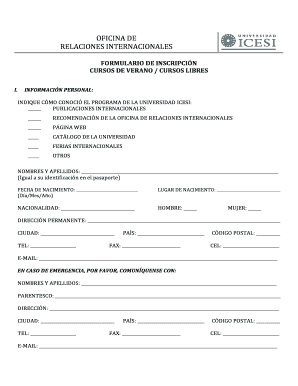
- Begin by providing personal information in the designated fields. Indicate how you learned about the program at Universidad Icesi by selecting from the provided options, such as international publications or web pages.
- Enter your full name exactly as it appears on your passport. Include your date of birth in the specified format (Day/Month/Year) and your place of birth.
- Detail your nationality and provide your permanent address along with your city, country, postal code, and contact numbers.
- For emergency contacts, fill in the required personal details of a person to be reached, including their name, relationship to you, and contact information.
- Complete the medical information section. Note your blood type, any allergies to medications or in general, and any required medications.
- In the academic information section, identify the university you are currently attending, including its country and city. Specify your professional area and academic program.
- State whether you have previously participated in an international program, providing details of the country, city, and university if applicable.
- Acknowledge that you have personally completed the application form by entering your name and the date. Also, ensure you sign where indicated.
- Attach copies of your passport and medical insurance documentation as required. Finally, save changes, download, print or share the completed form as needed.
Start completing your FORMULARIO INSCRIPCION CURSOS CORTOS.doc online today!
Related links form
Lo siguientes elementos son los más usuales dentro de una ficha de inscripción: Datos personales y de Contacto: Solicita datos primordiales del usuario como: Nombres, Apellidos, Documento de identidad y edad, y los datos de contacto como; Dirección, Correo y Teléfono.