Loading
Get Bankwest Esaver
How it works
-

Open form follow the instructions
-

Easily sign the form with your finger
-

Send filled & signed form or save
How to fill out the Bankwest Esaver online
This guide provides clear, step-by-step instructions on filling out the Bankwest Esaver form online. It aims to assist users in completing the form accurately and efficiently.
Follow the steps to successfully complete the Bankwest Esaver form.
- Click ‘Get Form’ button to obtain the document and open it in your chosen editor.
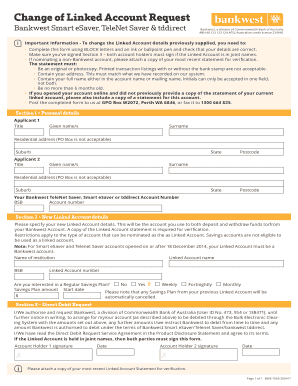
- In Section 1, enter the personal details for both applicants. This includes title, given name(s), surname, and full residential address. Note that PO Box addresses are not acceptable.
- Provide your Bankwest TeleNet Saver, Smart eSaver, or tddirect account number, along with the BSB number.
- Proceed to Section 2 to fill in the details for the new Linked Account. Specify the institution name, BSB, account name, and account number. Remember to attach a copy of the Linked Account statement for verification.
- Indicate if you are interested in setting up a Regular Savings Plan by marking 'Yes' or 'No'. If interested, fill in the savings plan amount and start date.
- For Section 3, both account holders must provide their signatures and dates to authorize the direct debit request. Ensure both parties have signed if the Linked Account is held in joint names.
- Attach the required copy of your most recent Linked Account Statement for verification before submitting the form.
- Once all sections are completed, you can save changes, download, print, or share the form as needed.
Complete your Bankwest Esaver form online now with these easy steps.
Existing-customer regular savers – what we'd go for ProviderRate (AER)Can you skip months?First Direct*7% fixed for one yearNo, min £25/monthLloyds Bank (need a Club Lloyds account)6.25% fixed for one yearYesNatWest / RBS6.17% variable on up to £5,000YesBank of Scotland5.5% fixed for one yearYes4 more rows • 28 Mar 2023
Industry-leading security and compliance
US Legal Forms protects your data by complying with industry-specific security standards.
-
In businnes since 199725+ years providing professional legal documents.
-
Accredited businessGuarantees that a business meets BBB accreditation standards in the US and Canada.
-
Secured by BraintreeValidated Level 1 PCI DSS compliant payment gateway that accepts most major credit and debit card brands from across the globe.