Loading
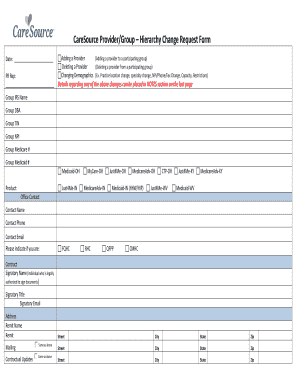
Get Health Partner Change Request Form Documents ... - Caresource
How it works
-

Open form follow the instructions
-

Easily sign the form with your finger
-

Send filled & signed form or save
How to fill out the Health Partner Change Request Form Documents - CareSource online
This guide provides a clear, step-by-step process for completing the Health Partner Change Request Form Documents from CareSource. Whether you are adding, deleting, or changing provider demographics, this guide will help you navigate the form efficiently.
Follow the steps to complete your Health Partner Change Request Form.
- Press the ‘Get Form’ button to access the form and open it in your preferred editing tool.
- Fill in the date at the top of the form to indicate when the request is being made.
- In the 'PR Rep' section, specify the action you are taking by selecting either 'Adding a Provider,' 'Deleting a Provider,' or 'Changing Demographics.'
- Provide details of any changes in the 'NOTES' section located on the last page of the form.
- Complete the group information section, including 'Group IRS Name,' 'Group TIN,' 'Group NPI,' and any applicable Medicare or Medicaid numbers.
- Select the product relevant to your submission from the list of options, such as 'Medicaid -OH' or 'MedicareAdv -IN.'
- Complete the contact information section with the office contact's name, phone number, and email address.
- Indicate your organization's designation by selecting 'FQHC,' 'RHC,' 'QFPP,' or 'CMHC' if applicable.
- Fill in the signatory details for the person authorized to sign the document, including their name, title, email, and address.
- Provide the mailing address if different from the remit address detailed earlier in the form.
- Input the provider information for each individual by providing their name, degree, address, phone, and relevant identifiers like NPI and CAQH numbers.
- Ensure you indicate any capacity limitations or restrictions in the designated fields.
- Once you have filled out all required fields, review the form for completeness and accuracy.
- Save the changes to the document and choose to download, print, or share the form as necessary.
Complete your Health Partner Change Request Form online today to ensure a smooth update process.
CareSource Medicaid is available across the state of Ohio. When you apply for Ohio Medicaid, you can choose CareSource as your managed care plan.