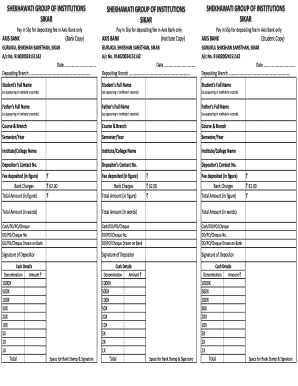
SHEKHAWATI GROUP OF INSTITUTIONS SIKAR Pay in Slip for depositing fee in Axis Bank only AXIS BANK (Bank Copy) SHEKHAWATI GROUP OF INSTITUTIONS SIKAR Pay in Slip for depositing fee in Axis Bank only.
Loading
Open form follow the instructions
Easily sign the form with your finger
Send filled & signed form or save
How to fill out the Axis Bank Challan online
Filling out the Axis Bank Challan online is a straightforward process that allows users to easily deposit fees. This guide provides step-by-step instructions to ensure that all necessary information is accurately completed.
Follow the steps to complete your Axis Bank Challan online.
- Click ‘Get Form’ button to obtain the form and open it in your editor.
- Enter the date of the deposit in the designated field. This is essential for record keeping and receipt purposes.
- Fill in the name of the depositing branch where the fee is being deposited. Ensure that this matches your intended branch for the transaction.
- Input the student's full name as it appears in the institution's records. This helps to accurately attribute the payment.
- Provide the father's full name in the corresponding field, again as it appears in the institution's records.
- Select the course and branch of study of the student, which is crucial for classifying the payment correctly.
- Indicate the semester or year in the relevant section to denote the time period for which the payment is made.
- Enter the name of the institute or college where the student is enrolled.
- Fill in the depositor's contact number to ensure communication can be made if necessary.
- Input the fee deposited amount in figures. Accuracy here is vital for financial records.
- Complete the bank charges section by filling in the appropriate fees, typically noted for transactions.
- Sum the total amount and enter it in both figures and words, ensuring to have an accurate financial record.
- Indicate the type of payment method used (cash, DD, PO, or cheque) along with any relevant numbers and the bank from which the payment is drawn.
- The depositor must sign in the designated area, confirming the authenticity of the transaction.
- Complete the cash details section by providing denominations and their corresponding amounts to clarify the source of deposit.
- Finally, ensure there is space left for the bank’s stamp and signature for validation of the transaction.
- Once all fields are completed, save the changes, download, print, or share the form as needed.
Complete your Axis Bank Challan online to simplify your fee payment process.
Experience a faster way to fill out and sign forms on the web. Access the most extensive library of templates available.
Related content
(5), AXIS BANK LIMITED, HONG KONG BRANCH as agent of the Finance ... duly completed e-Form...
You can pay the cost of application fee through Credit Card / Debit Card/ Net. Banking or...
Payment through ICICI Bank, HDFC Bank and Axis Bank can be done by ... On successful...
Get answers to your most pressing questions about US Legal Forms API.
How can I get TDS payment receipt?
You can raise a request for the same online. Corresponding duplicate receipt will be sent to email ID as per the latest TDS/TCS statement submitted at TIN Facilitation Centres or Online filing at Protean .
How to download Challan 280 receipt?
How to Download TDS Challan? 1) Visit TIN NSDL website. 2) Go to 'Services' section and click on OTLAS. 3) You will be redirected to OTLAS-Challan Status Inquiry Page. Click on download. 4) You will be redirected to the 'Challan' page. From here, you can download your required copy of TDS Challan.
How can I Download paid TDS receipt?
How to Download TDS Challan? 1) Visit TIN NSDL website. 2) Go to 'Services' section and click on OTLAS. 3) You will be redirected to OTLAS-Challan Status Inquiry Page. Click on download. 4) You will be redirected to the 'Challan' page. From here, you can download your required copy of TDS Challan.
How to Download TDS return Acknowledgement from new income tax website?
Step 1: Visit the income tax e-filing portal at the URL http://.incometaxindiaefiling.gov.in/home. Step 2: Log in to the e-filing portal with your log in credentials. Step 3: Select the 'View Filed TDS' option under the 'TDS' tab.
How can I pay TDS online through Axis Bank?
Select the service provider. Fill in the details of the Challan and submit the transaction. Select AXIS Bank from the list of banks given. Enter your NetBanking Customer ID and Password. Enter your account details to get your account debited online. Print the online Challan instantaneously.
How can I check my TDS payment details?
Status of e-filing of TDS Statement by your deductor Step – I. Visit https://.tdscpc.gov.in/app/tapn/tdstcscredit.xhtml. Step – II. Enter the Captcha code and click on Proceed. Step – III.
What is the code for TDS payment?
ITNS 281 – This Challan is used for depositing Tax Deducted at Source (TDS) or Tax Collected at Source (TCS). Challan No. ITNS 282 – This is to be used in case of payment of Gift Tax, Wealth Tax, Expenditure Tax, Estate Duty, Securities Transaction Tax and Other Direct Taxes.
How can I generate GST Challan in Axis Bank?
Goods and Services Tax (GST) Payments through Corporate Internet Banking (CIB) of Axis Bank. Goods and Services Tax (GST) Payments through Corporate Internet Banking (CIB) of Axis Bank. Step 1: Visit GSTN website (https://.gst.gov.in/) > Login. ... Click on the “Services” tab > select “Payments” > choose “Create Challan”.
Use professional pre-built templates to fill in and sign documents online faster. Get access to thousands of forms.
If you believe that this page should be taken down, please follow our DMCA take down process here.