Loading
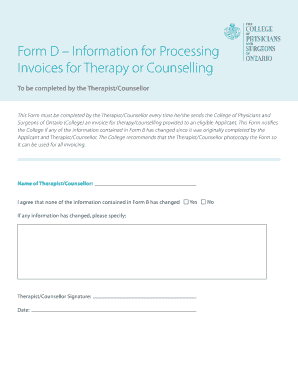
Get Form D Information For Processing Invoices For Therapy Or ...
How it works
-

Open form follow the instructions
-

Easily sign the form with your finger
-

Send filled & signed form or save
How to use or fill out the Form D Information For Processing Invoices For Therapy Or Counselling online
The Form D Information For Processing Invoices For Therapy Or Counselling is a crucial document that therapists and counsellors must complete when submitting invoices to the College of Physicians and Surgeons of Ontario. This guide provides a clear, step-by-step approach to filling out this form online, ensuring that you meet all necessary requirements.
Follow the steps to effectively complete the form online.
- Click ‘Get Form’ button to obtain the form and open it in your editor.
- Enter the name of the Therapist/Counsellor in the designated field. Ensure that the spelling is correct, as this information will be submitted to the College.
- Indicate if any information contained in Form B has changed by selecting 'Yes' or 'No'. If you choose 'Yes', provide detailed specifics in the space allocated for changes.
- The Therapist/Counsellor must sign the form to certify that the information is accurate. This section typically includes a space for the signature.
- Fill in the date on which the form is completed, which is essential for record-keeping.
- After completing the form, review all entries for accuracy and completeness.
- Once finalized, users can save changes, download the completed document, print it for physical records, or share it as necessary.
Complete your Form D Information for Processing Invoices online today!