Loading
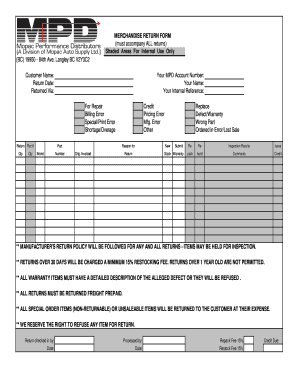
Get Merchandise Return Form Shaded Areas For Internal
How it works
-

Open form follow the instructions
-

Easily sign the form with your finger
-

Send filled & signed form or save
How to fill out the MERCHANDISE RETURN FORM Shaded Areas For Internal online
This guide provides a step-by-step approach to effectively completing the Merchandise Return Form Shaded Areas For Internal. By following these instructions, users can ensure a smooth process for returning items.
Follow the steps to accurately complete the form for returns.
- Select the ‘Get Form’ button to access the Merchandise Return Form and open it in your chosen online editor.
- Fill in the customer name field with the name of the individual returning the merchandise.
- Enter the return date in the designated space, ensuring that the date is current and accurately reflects the day the item is being returned.
- Specify how the return is being sent back by completing the 'Returned Via' section, indicating the shipping method used.
- Input your MPD account number to link the return to your account, providing necessary context for the return process.
- Write your name in the appropriate field for identification. This helps in associating the return with the correct individual.
- Provide your internal reference number if applicable, which can assist in tracking the return internally.
- Select the reason for returning the merchandise from the available options (e.g., for repair, billing error, special/print error, etc.) and check the corresponding box.
- Indicate the quantity of items being returned in the 'Qty' field, ensuring clarity on how many units pertain to this return.
- Document product details including part number and brand to facilitate processing and matching with original invoices.
- Outline any additional issues related to the return (e.g., pricing error, manufacturer's error) by checking relevant boxes.
- If returning defective or wrong items, check the boxes specifying these issues, such as defect/warranty or ordered in error.
- Submit any comments or additional information about the return in the comments section, assisting personnel in understanding your concerns.
- Complete the inspection results section if applicable, indicating any findings that relate to the condition of the returned item.
- Finally, review all entered information for accuracy, and then save changes, download, print, or share the completed form as necessary.
Start filling out your Merchandise Return Form online to ensure a smooth return process.
Industry-leading security and compliance
US Legal Forms protects your data by complying with industry-specific security standards.
-
In businnes since 199725+ years providing professional legal documents.
-
Accredited businessGuarantees that a business meets BBB accreditation standards in the US and Canada.
-
Secured by BraintreeValidated Level 1 PCI DSS compliant payment gateway that accepts most major credit and debit card brands from across the globe.