Loading
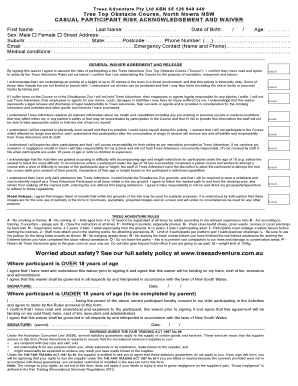
Get Waiver Nowra.docx
How it works
-

Open form follow the instructions
-

Easily sign the form with your finger
-

Send filled & signed form or save
How to fill out the Waiver Nowra.docx online
Filling out the Waiver Nowra.docx is an essential step for anyone participating in the Trees Adventure Tree Top Obstacle Course. This guide provides clear, detailed instructions to help you complete the waiver efficiently and accurately, ensuring a smooth experience during your adventure.
Follow the steps to fill out the Waiver Nowra.docx online
- Click the ‘Get Form’ button to access the Waiver Nowra.docx and open it in your chosen online editor.
- Begin by filling in your personal details. Provide your first name, last name, date of birth, age, and sex in the corresponding fields.
- Enter your complete street address, including suburb, state, and postcode in the designated sections.
- Input your phone number, including the area code, followed by your email address.
- List your emergency contact's name and phone number to ensure safety during your participation.
- Disclose any medical conditions in the space provided, which may affect your participation in the course.
- Read through the general waiver agreement carefully. You will need to provide initials in the indicated areas to confirm your understanding and acceptance of the terms.
- If you are over 18, sign and date the form in the specified area. If you are under 18, a parent or guardian must complete the relevant section, including signing and dating the form.
- Review all fields to ensure accuracy before submitting.
- Once completed, save your changes, and choose to download, print, or share the document as needed.
Complete your documents online today for a seamless experience!