Loading
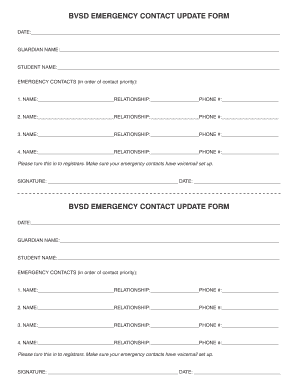
Get Bvsd Emergency Contact Update Form - Nvh Bvsd
How it works
-

Open form follow the instructions
-

Easily sign the form with your finger
-

Send filled & signed form or save
How to fill out the BVSD EMERGENCY CONTACT UPDATE FORM - Nvh Bvsd online
Filling out the BVSD Emergency Contact Update Form is essential for ensuring that your child's safety and communication preferences are effectively managed. This guide provides clear instructions to assist you in completing the form accurately and efficiently.
Follow the steps to complete your emergency contact update form online.
- Press the ‘Get Form’ button to access the BVSD Emergency Contact Update Form and open it in your document editor.
- Begin by entering the date at the top of the form. This is important for record-keeping purposes.
- In the 'Guardian Name' field, provide the full name of the person who is responsible for the student.
- Next, fill in the 'Student Name' section with the name of the child for whom you are updating the emergency contact information.
- Proceed to the 'Emergency Contacts' section. Here, you will list up to four contacts in order of priority. For each contact, complete the following fields: 1) Name, 2) Relationship to the student, and 3) Phone number.
- Make sure to double-check that all contact numbers are accurate and that the contacts have voicemail set up, as this is essential for effective communication in emergencies.
- Finally, sign the form at the bottom where indicated and enter the date of signing.
- Once all sections are completed, save your changes, and you have the option to download, print, or share the form as needed.
Complete your BVSD Emergency Contact Update Form online today to ensure accurate safety and communication.
303-447-1010. Contact Us - Boulder Valley School District bvsd.org https://.bvsd.org › connect-with-us bvsd.org https://.bvsd.org › connect-with-us